The tool at spokeo.com/optout removes public listings from Spokeo operated sites except ThatsThem, which takes its own request. It doesn't remove records from their original sources, records available only through other Spokeo products, or regulated data sold to qualified businesses and government agencies. Spokeo also keeps court records unless you provide an order of expunction or sealing. To remove an eligible listing, search for yourself, open your profile, and submit its URL with an email address. The walk took around five minutes, and the listing disappeared within the 2 to 3 days quoted on the confirmation screen.
Want the background first? The Spokeo data broker profile covers who runs the company, the FTC settlement, the Supreme Court case, and the five sister domains on its filing.
Quick facts
Removal Overview
Email-verified
Method
Profile URL paste + reCAPTCHA + email link
Active time
~5 minutes
Difficulty
Easy
Account required
No
Verification
reCAPTCHA + email link
Result appears
24-48 hours per the page · 2-3 days per the confirmation screen
One opt-out per listing
Yes - URL-based
Re-listing risk
Medium · Re-check quarterly
Prereqs
What you'll need before you start
3 things
Something Spokeo can match you on. Your full name, a phone number, an address or an email address all work as the search key. Start with whichever one is most likely to find the profile that's actually live.
An inbox you'll open in the next few minutes. The request doesn't count until you click the link Spokeo sends. A relay address (Apple's Hide My Email, Firefox Relay) keeps your main inbox out of it.
Somewhere to hold a URL for a moment. You'll lift the address of your profile page out of the browser bar and drop it into the form two screens later.
The 6 steps
Remove your listing
~5 minutes total
01
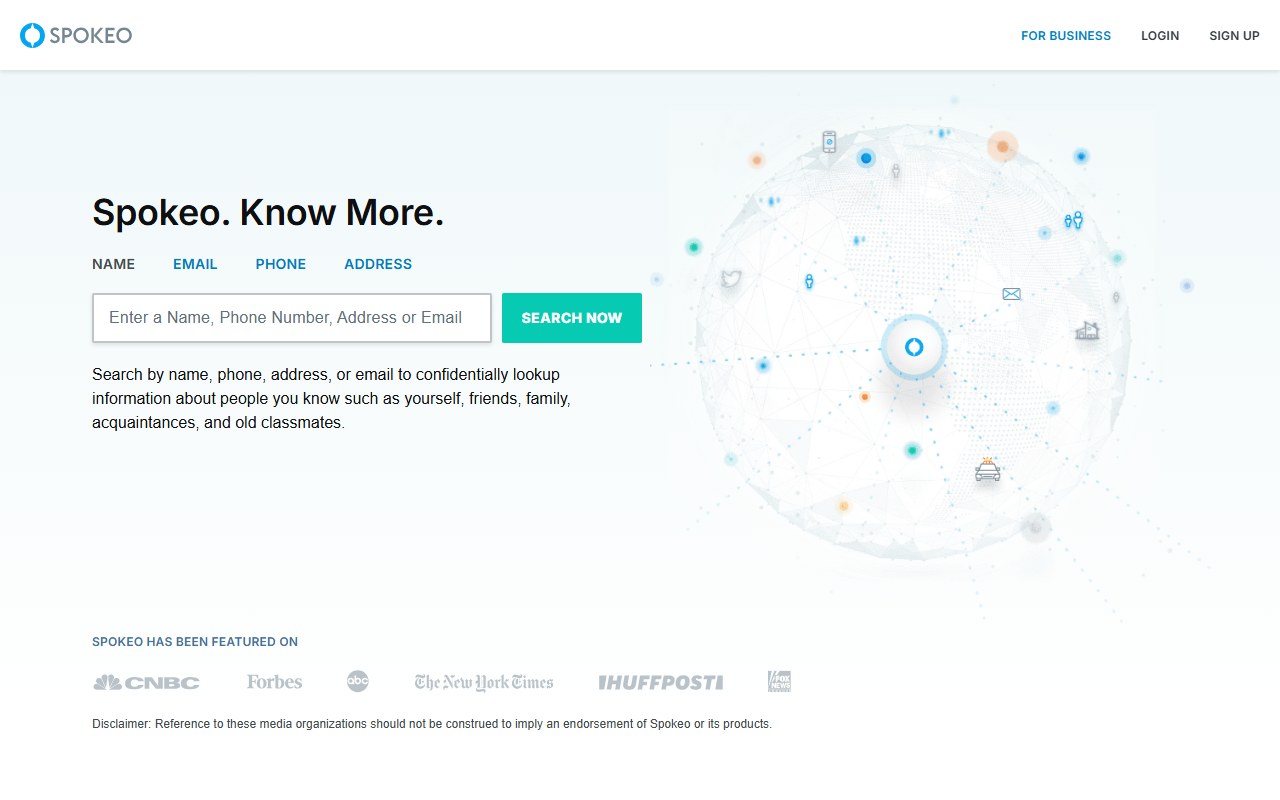
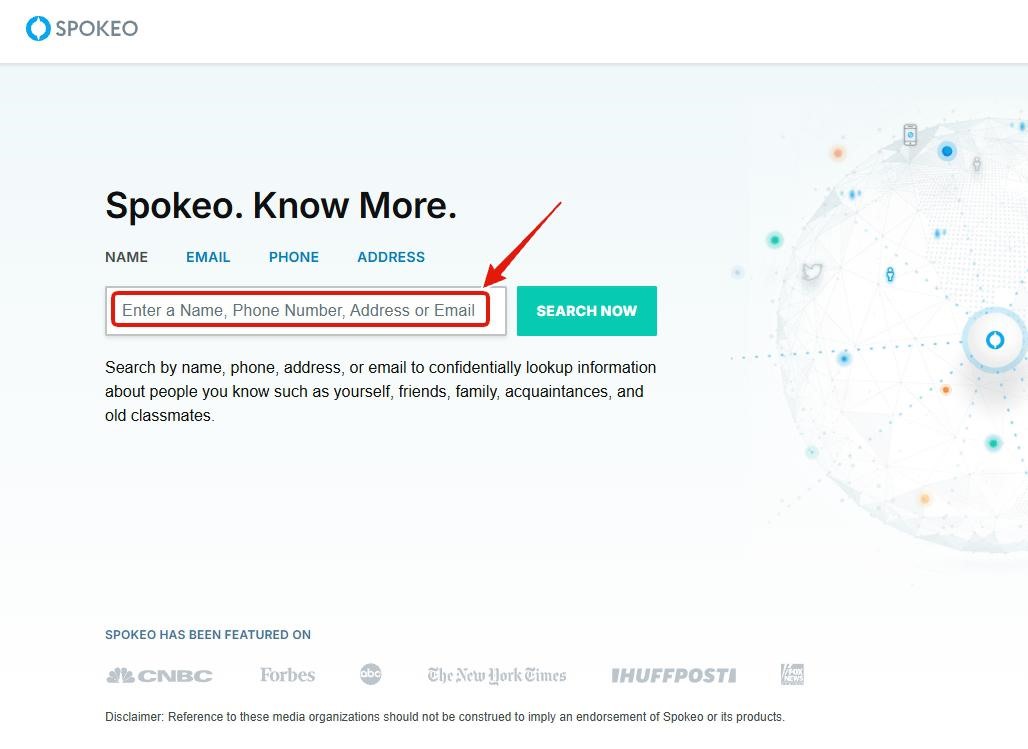
Go to the Spokeo homepage and search for yourself
Go to https://www.spokeo.com/. The homepage has the heading "Spokeo. Know More." with tabs for NAME · EMAIL · PHONE · ADDRESS. Type one of your identifiers - your full name, an email address, a phone number, or a street address - into the input field, then click the green SEARCH NOW button.
Search by name, email, phone, or address. Click SEARCH NOW.
02
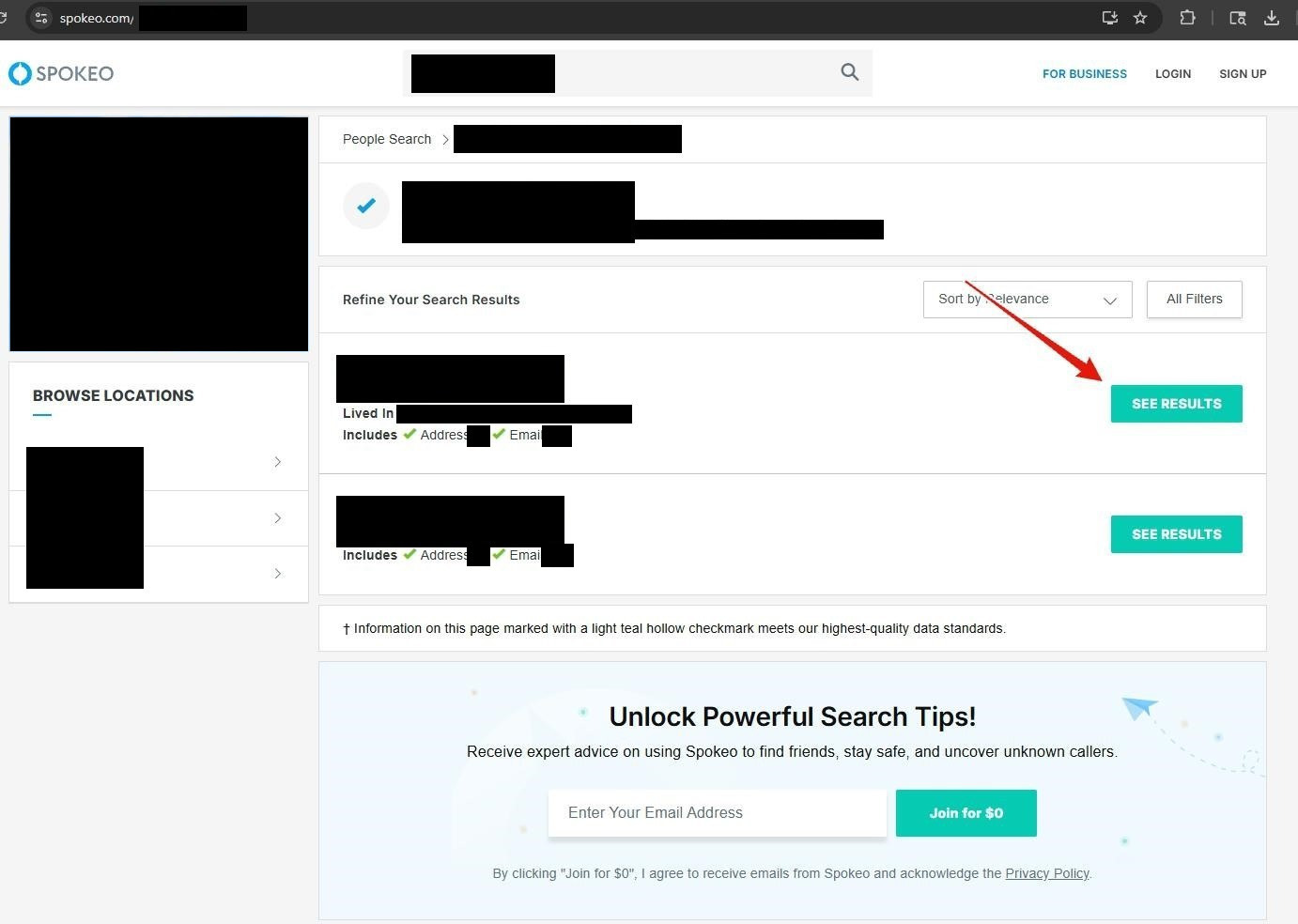
Find your matching profile and click the green SEE RESULTS button
Spokeo answers with a list of profiles that fit what you typed. Each row says where that person has lived and what the file holds, along the lines of "Lived In Denver CO, Boulder CO · Includes Address(3), Email(7)" (made-up example). Find the row that is you and click its green SEE RESULTS button to open the full profile.
Click SEE RESULTS on the row that matches you.
03
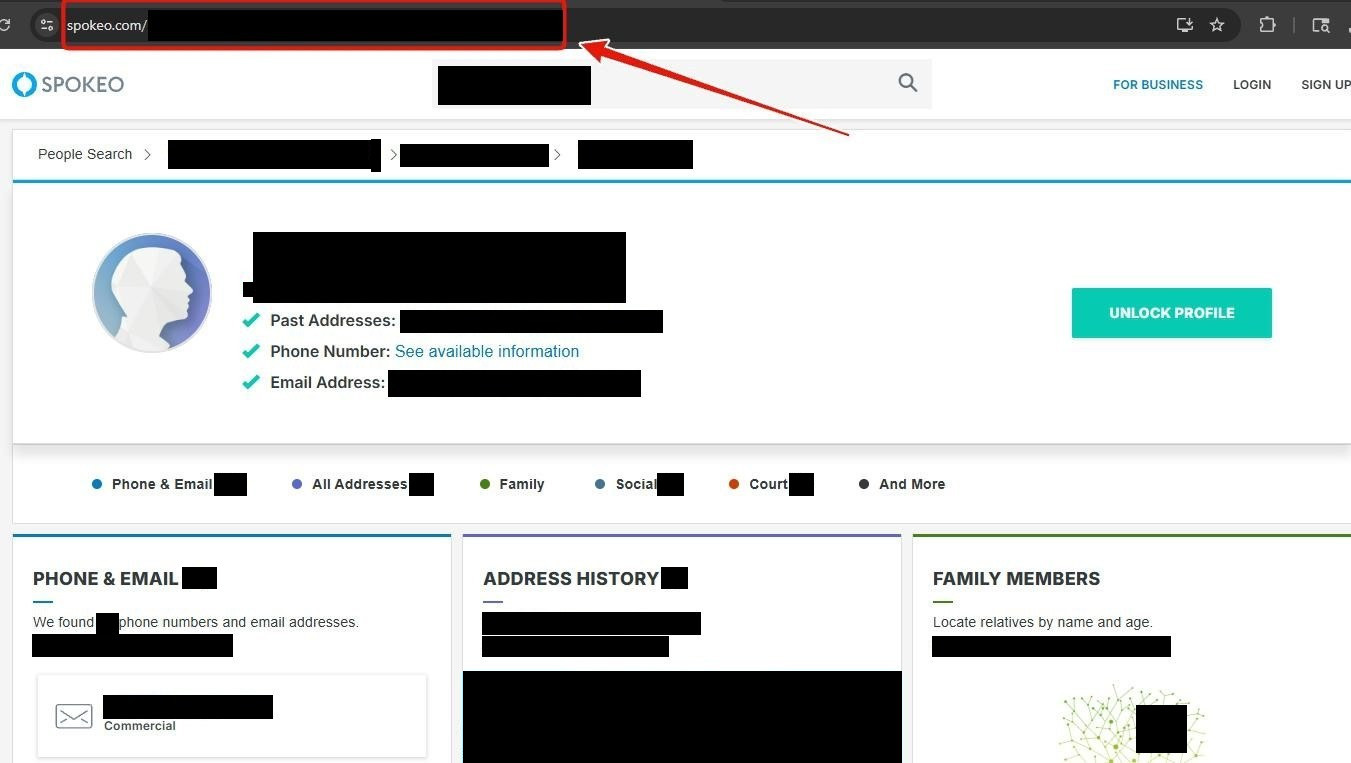
Copy your profile URL from the address bar
Once your profile is open, the address bar holds the one thing the opt-out form wants. Select the whole address and copy it. It follows the pattern https://www.spokeo.com/First-Last/State/City/p123456789, and the number on the end is what identifies your listing.
Grab the whole address, including the number at the end.
04
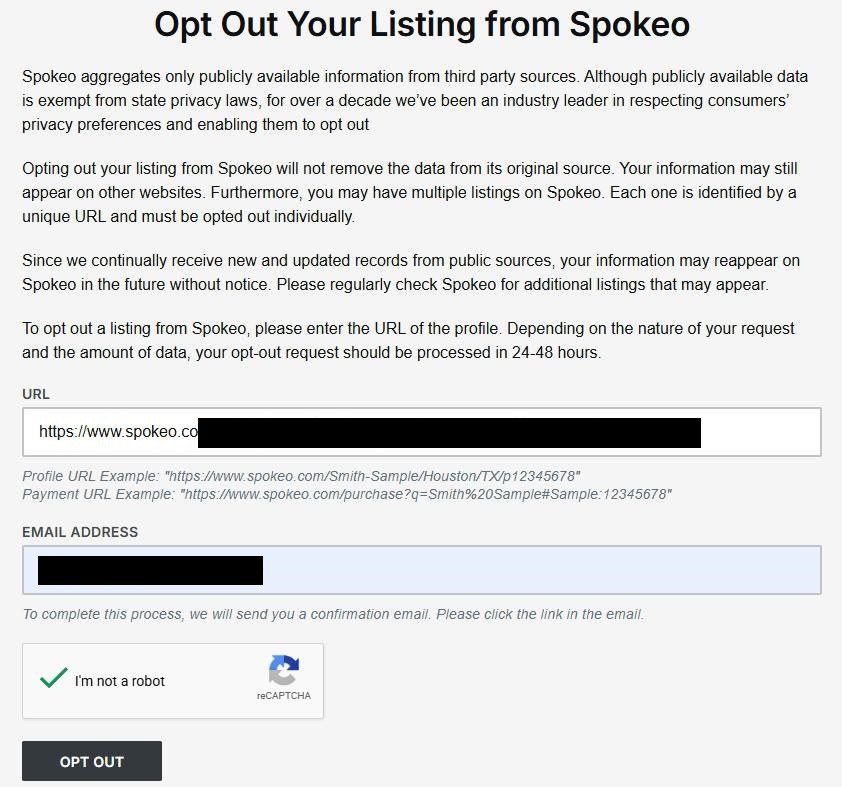
Go to the opt-out page, paste your URL, enter your email, click OPT OUT
Go to https://www.spokeo.com/optout. Drop the address from step 3 into the URL box (its placeholder reads "Enter URL here"), put your email in EMAIL ADDRESS, tick the reCAPTCHA, and press the black OPT OUT button.
Paste URL, enter email, tick the reCAPTCHA, click OPT OUT.
05
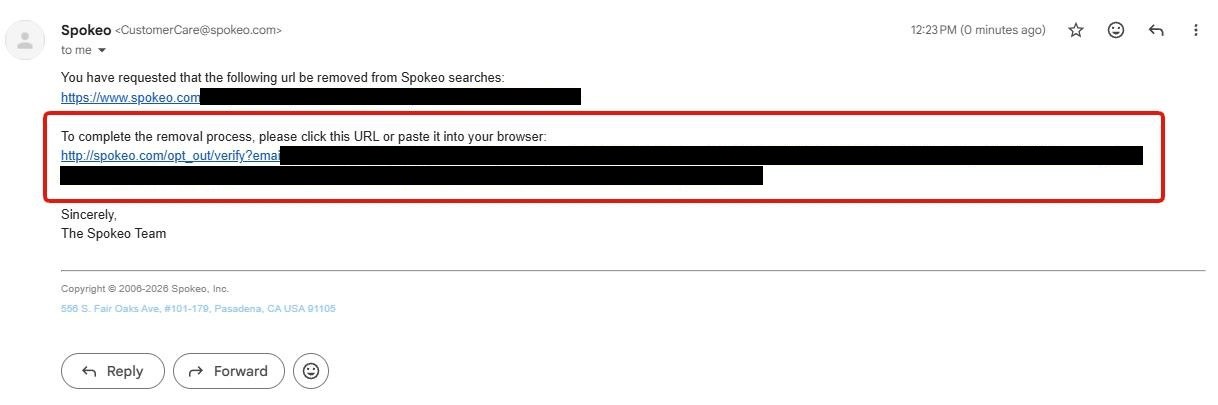
Click the confirmation link in the email Spokeo sends
Within a few minutes, Spokeo sends a confirmation email to the address you entered. Open the email and click the confirmation link. The opt-out isn't active until the link is clicked.
Click the link to confirm the opt-out.
06
Verify the green confirmation message on the opt-out page
The confirmation link brings you back to the Spokeo opt-out page. Scroll to the bottom of the form. You should see a green confirmation message reading: "We've received your request to remove the profile: [Your Name & Address]. Please allow 2-3 days for this update to be reflected on the site."
Green confirmation text at the bottom of the opt-out page is the final receipt.
Confirm it worked
Did it actually work?
2-3 days later
Give it the 2-3 days the confirmation screen quotes before you check (the page itself says 24-48 hours; the longer figure is the safer one).
Use a private window, so a cached page can't fool you, and go back to spokeo.com.
Run the same search you ran in step 1.
Your row should be gone, and the old profile URL should land on a "Profile not found" page.
Spokeo splits one person across several profiles whenever there's address history, so if a second or third row is still you, run steps 1 to 6 again for each one. Every URL is its own request, and three or four profiles for one person is normal.
Set a 90-day reminder. Fresh public records keep arriving, and a new listing can surface months after a clean opt-out.
Troubleshooting
If it doesn't work
Common failures
No email from Spokeo. Look in spam and promotions. If nothing has landed after half an hour, go back to step 4 and submit again with a different address.
The link says it has expired. Submit the form again from step 4. The newer request replaces the one you never confirmed.
The form bounces the URL. It wants the whole profile address, ending in the /p123456789 ID. Shortened, partial, or search-result URLs get rejected.
Still listed after three days. Email privacy@spokeo.com with the green confirmation text from step 6, the listing URL and the date you submitted. The registered CCPA contact, legal@spokeo.com, is the next rung up.
Money left your card. Opting out costs nothing. A $0.95 trial or a $29.95 monthly charge means a paid Spokeo membership got started along the way. Cancel it through Spokeo support, and dispute it with your card issuer if they won't refund.
Stay off
Keep your record off the site
Re-listing is common
Put a quarterly check in your calendar. Spokeo keeps pulling fresh public records, and its own opt-out page says a listing can reappear without notice, so a clean opt-out in March can be undone by a new property or voter filing in June.
Expect more than one profile if you've moved. Each stretch of address history can spawn a separate Spokeo page with its own URL, and every one of them needs its own opt-out. I've cleared three at once after a single move.
Thin out what Spokeo has to read from. Its page says the data comes from public records and third-party sources, so clearing your record at the bigger brokers that feed those pools leaves its scraper less to rediscover.
Route non-essential mail through a PO Box or forwarding service. Fresh property and voter records tied to a home address are the re-listing trigger we see most often.
Take yourself off data broker sites
Redact scans data broker sites from your device, finds where your details are listed, and submits the removal requests for you. If a broker relists you, it files again.
May 22, 2026 · Walked end to end, six screens photographed. Family routing and the stay-off advice were reworded on September 8, 2026 when the guide moved to the main site. The scope of the tool was read off Spokeo's privacy policy again on September 17, 2026, which names ThatsThem as the only operated site it leaves out. The walked steps are unchanged.
![Spokeo opt-out page after verification, showing the URL and email form again plus a green confirmation message at the bottom reading 'We've received your request to remove the profile: [name] at [address]. Please allow 2-3 days for this update to be reflected on the site.' Below that is a 'Our customer care representatives are available to assist you here, or you can email us directly at privacy@spokeo.com.' line.](/broker-images/versions/f997813a316239d185483fc8325d14d039dead950c853a61f2f4f1fe77d04a09/spokeo-com/step-6.jpg)