Buckle up - this is a genuine seven-hoop flow with sponsored competitor results sitting under your real one and a BrandYourself affiliate-upsell button planted on two different screens. You'll start at smartbackgroundchecks.com/optout (email + terms + CAPTCHA), then go to the homepage to actually search, pick the top result (the ones below are sponsored data-broker ads, not what you want), hit Request My Record To Be Removed, see a confirmation page with a giant red ad button to ignore, click the verification link in the email, and land on a success page that also shows the same ad button to ignore. About 10-15 minutes. Processing 72 hours.
Do NOT click the "Remove My Personal Info from 20+ Other Sites Now" button. It appears on both the email-sent confirmation page (step 5) and the final success page (step 7), styled as a big red button. That's a BrandYourself affiliate-partner upsell - SmartBackgroundChecks earns a referral commission if you sign up. Your SmartBackgroundChecks opt-out is already underway by the time this button shows up, so just ignore it and close the tab when you're done.
On the results page (step 3), click the TOP result only. The entries below your real record have bright blue VIEW DETAILS buttons - those are sponsored competitor data brokers, not your actual record on SmartBackgroundChecks. Clicking them takes you off-site to a different broker.
I'd use a forwarding / disposable email. You have to hand over an email before the broker will let you search, and the verification link arrives there. A masked address via Apple Hide My Email, Firefox Relay, or SimpleLogin keeps your primary inbox out of their hands.
The verification link expires in 24 hours. Plan to do steps 1-6 in one sitting. If the link expires, you'll have to restart from step 1.
Prereqs
What you'll need before you start
2 things
A real email inbox you can check today. SmartBackgroundChecks sends a 24-hour-expiring verification link to whatever address you submit on step 1. I'd recommend a forwarding / disposable address rather than your primary inbox.
Your name and city / state. The homepage search takes first name + middle initial + last name + city/state. If you have multiple records (older addresses, nickname variants), plan to re-run the flow - but you can do up to 5 records per terms-acceptance, so cluster them in a single session if you can.
The 7 steps
Remove your listing
~10-15 minutes total
01
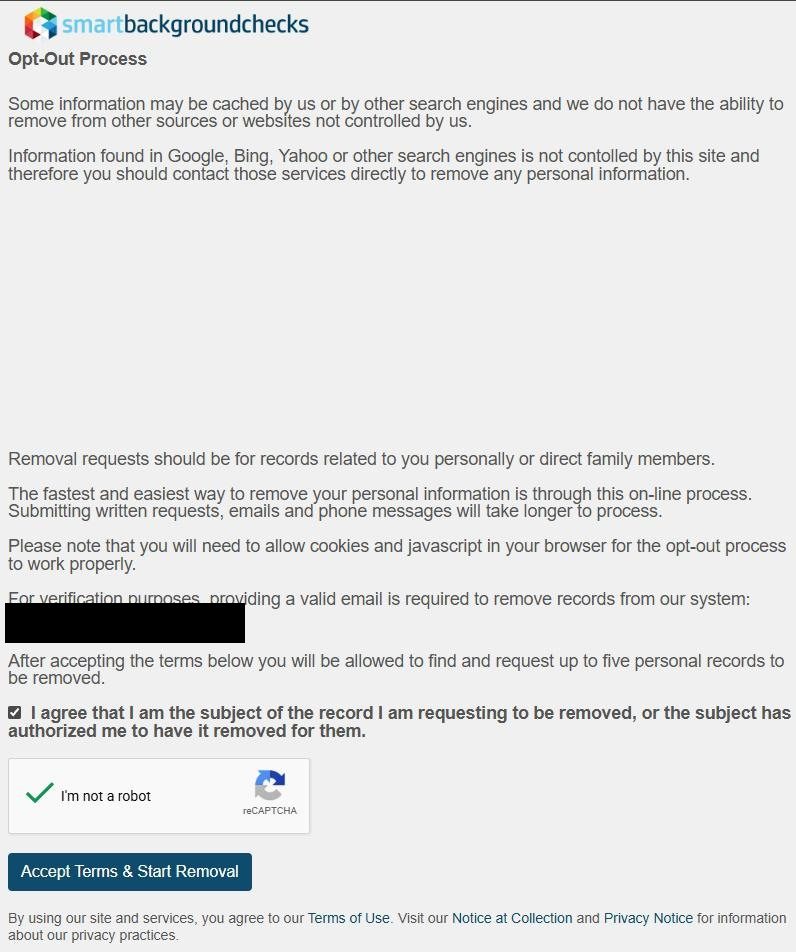
Go to smartbackgroundchecks.com/optout, fill email + terms + CAPTCHA, click Accept Terms & Start Removal
Open smartbackgroundchecks.com/optout. Enter your email, tick the box agreeing you're the subject of the record (or authorized to act on their behalf), solve the I'm not a robot reCAPTCHA, and click the blue Accept Terms & Start Removal button. The page tells you that accepting terms allows up to five personal records to be removed in this session.
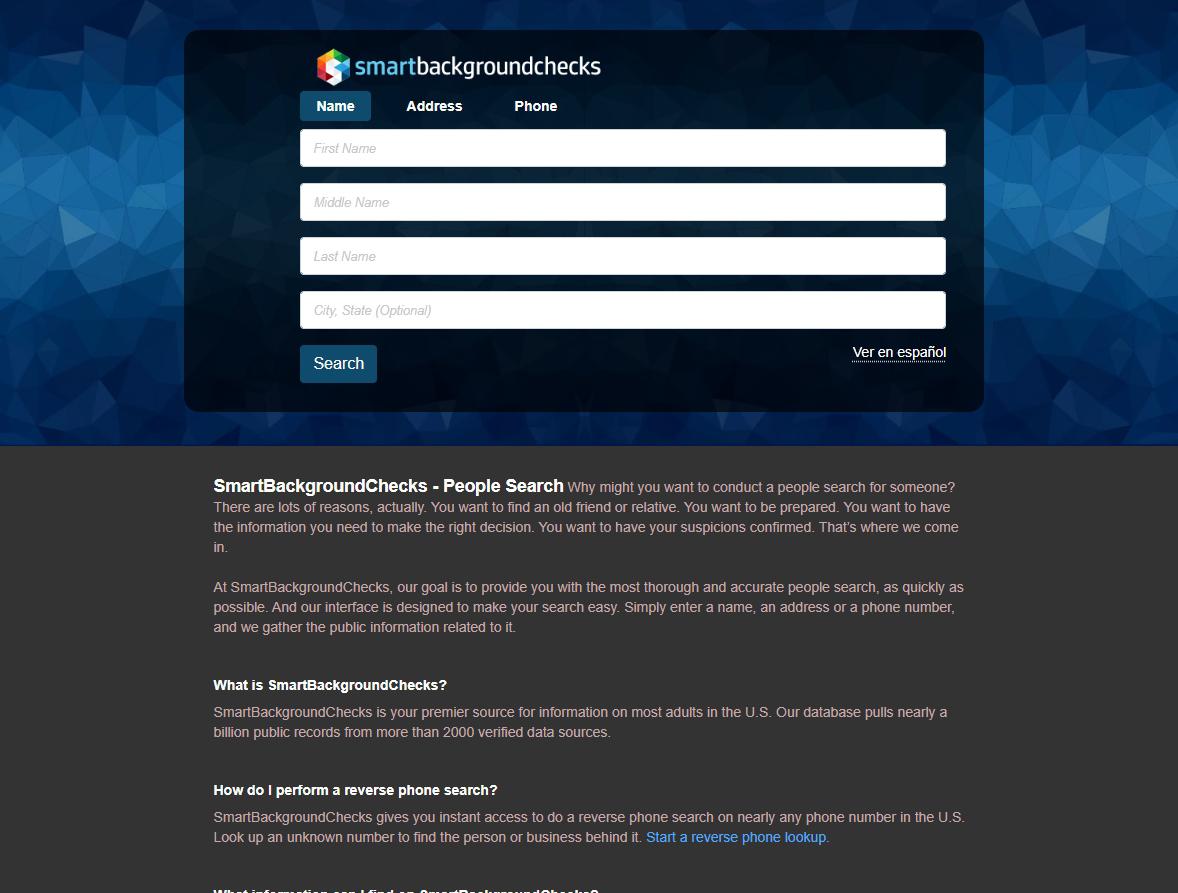
Click the search features link (or go straight to smartbackgroundchecks.com) and fill the search form
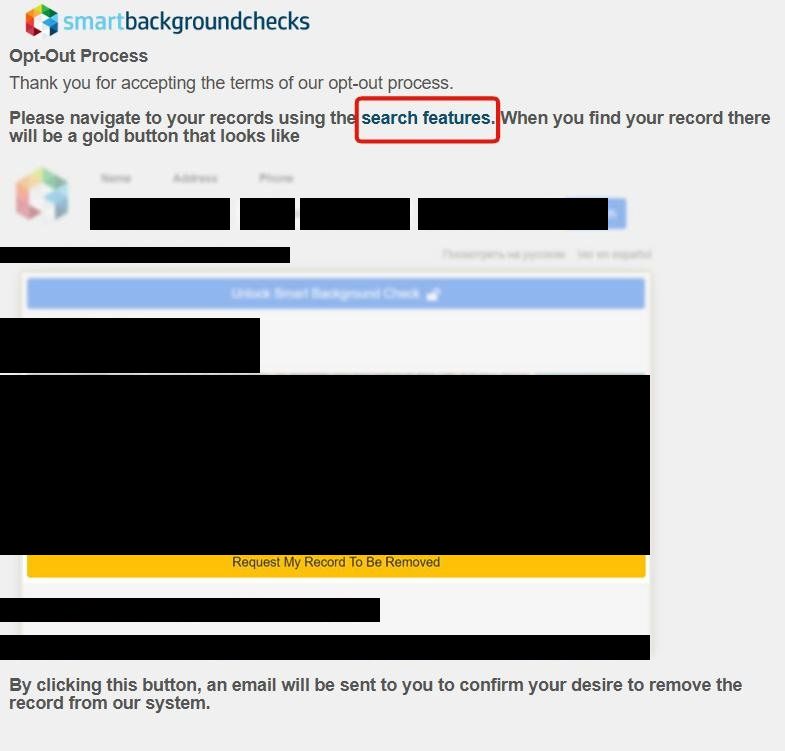
The next page thanks you for accepting the terms and tells you to "navigate to your records using the search features" with a hyperlink. Click that, or just go to smartbackgroundchecks.com directly. Fill in your first name, middle initial, last name, and city/state, then click Search.
Click the search features link or go to the homepage.
03
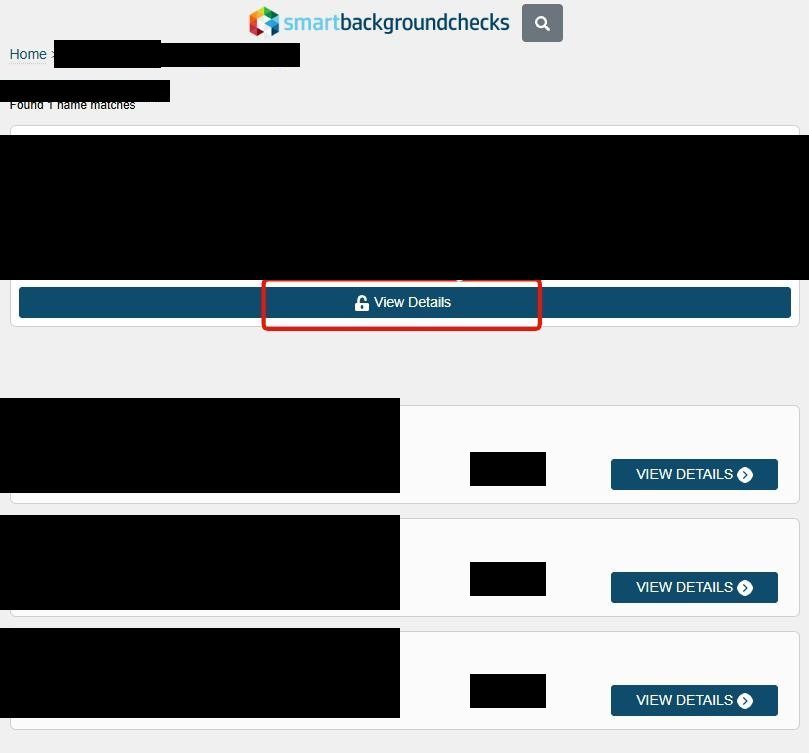
Click View Details on the TOP result - the ones below are sponsored competitor ads
The results page shows your real record at the top with a dark View Details button (lock icon). The entries below have bright blue VIEW DETAILS buttons - those are sponsored data-broker competitors that route to other people-search sites, not your actual SmartBackgroundChecks record. Click the top one only.
Click View Details on the TOP result. Skip the blue-button sponsored ones below.
04
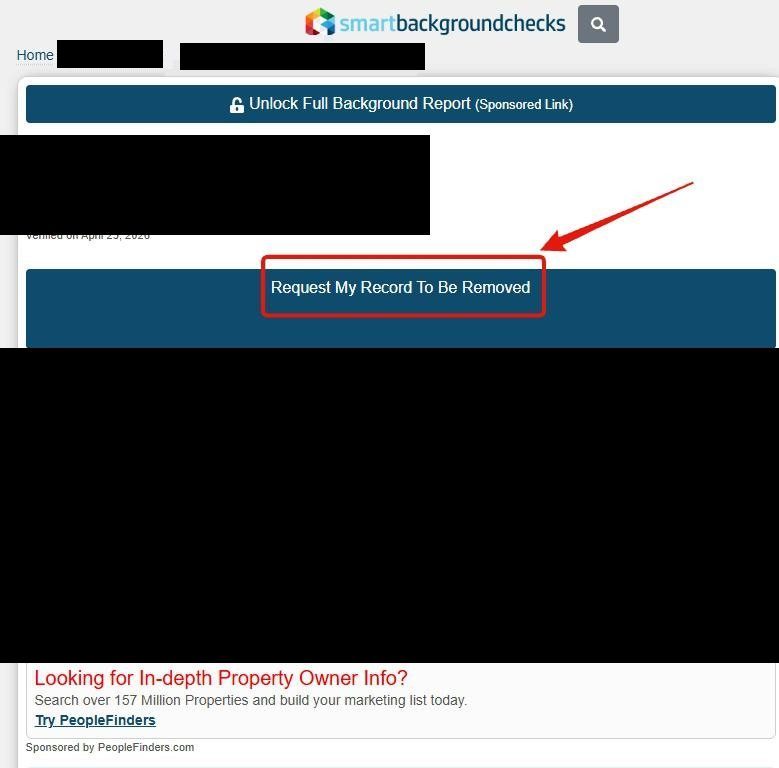
Click the dark Request My Record To Be Removed button
Your profile loads with a "Sponsored Link" Unlock Full Background Report bar at the top (ignore it), your name, and a Verified on [date] stamp. Click the dark blue Request My Record To Be Removed button just below your name. A map and another sponsored block (PeopleFinders.com) appear further down - ignore those too.
Click the dark Request My Record To Be Removed button.
05
See the "email sent" confirmation - do NOT click the BrandYourself ad button
The next page is titled Opt-Out Confirmation Sent and reads "Your opt-out request has been received. We have sent a confirmation email to the address provided. Please check your email for a link to complete the opt-out process." Just below that message sits a big red Remove My Personal Info from 20+ Other Sites Now button - that's a BrandYourself affiliate-partner upsell that pays SmartBackgroundChecks a kickback. Ignore it and go straight to your email.
Email is on its way. Do NOT click the red BrandYourself button.
06
Open the email and click the blue button in the middle
Check your inbox for an email titled "Opt out request for smartbackgroundchecks.com" from support@smartbackgroundchecks.com. The body has a blue Click here to remove [name] button - click it. The link expires in 24 hours, and the email notes the request will be processed within 72 hours.
Click the blue button in the email within 24 hours.
07
Success page - ignore the same BrandYourself ad and close the tab
The verification link lands you on the final Opt-Out Request Submitted page: "Voucher-redeemed-successfully. We are processing your request and your data should be removed shortly. Please be sure to clear your browser cache before checking again." The same red BrandYourself button from step 5 reappears below - ignore it again. Close the tab. Your record is queued for removal within 72 hours.
Done. Ignore the same red button one more time and close the tab.
Confirm it worked
Did it actually work?
72 hours
Wait 72 hours after clicking the email verification link - that's the processing window SmartBackgroundChecks states in the confirmation email.
Clear your browser cache (or open a private / incognito window) before re-checking. The success page specifically warns about cached pages showing a removed record as still live.
Your record should no longer appear in the results. The sponsored competitor results below your old position will still show up - those are different sites entirely.
If you matched multiple listings (older addresses, nickname variants), we recommend re-running steps 2-6 once per listing - and remember you can do up to five records per terms-acceptance session.
Set a 90-day reminder to re-check. Third-party guides report SmartBackgroundChecks runs on roughly a 12-month database refresh cycle, so a re-listing after a successful opt-out is common as new public records surface.
Troubleshooting
If it doesn't work
Common failures
The verification email never arrives. Check spam / promotions for support@smartbackgroundchecks.com. If it's not there after 30 minutes, I'd restart from step 1 rather than waiting longer.
You waited and the 24-hour email link expired. Restart from step 1 - the link is single-use and time- limited.
You clicked the red BrandYourself button by accident. Nothing actually happens until you sign up and pay for BrandYourself's plan. Just close that tab - your SmartBackgroundChecks opt-out is unaffected.
You clicked one of the blue VIEW DETAILS sponsored results in step 3. That takes you off-site to a competitor data broker. Hit your browser's back button and click the dark View Details on the top result instead.
reCAPTCHA won't pass. Try a different browser, disable ad-blockers / privacy extensions for the session, and avoid VPN / Tor exit nodes - all three tend to bump the reCAPTCHA into harder challenges.
Record still appears after 72 hours. BBB customer reviews of SmartBackgroundChecks document opt-outs that submitted but never processed. I'd re-run the entire flow once, and if it's still up after another week, escalate by calling the BBB-listed toll-free number (800) 571-0614 or filing a complaint via the BBB profile itself.
Stay off
Keep your record off the site
Re-listing is common
We recommend re-checking quarterly. Third-party broker guides describe a roughly 12-month refresh cycle on the SmartBackgroundChecks database, so a new listing can appear weeks or months after a successful opt-out as new property, voter, court, or directory data surfaces.
Watch for multiple profiles. Address changes and name variants (middle initial, nickname, maiden name) tend to produce separate SmartBackgroundChecks records. I'd re-check by all the variants you've used. The per-session limit is five records per terms-acceptance.
Also opt out of FastBackgroundCheck.com. That's a separate broker run under the same named principal Julian Burgess - see the profile network section. If you're concerned about SmartBackgroundChecks specifically because of the arrest-record exposure, the related operator is a natural place to check too.
Suppress upstream sources where possible. Court records and property assessor data are the most common re-listing triggers we see; some states allow address confidentiality programs (often for victims of stalking or domestic violence) that suppress your record at the source.
I'd suggest a forwarding mailbox or PO Box for non-essential mail and a masked email forwarder for non-essential signups. New property records and new email-list signups are the biggest re-listing triggers we've seen across the people-search category.
Don't click the BrandYourself prompt on a future opt-out either. Paying for a removal service that pays kickbacks to the broker you're removing from is the same structural conflict-of-interest pattern we've documented for ClustrMaps / OneRep - see the ClustrMaps profile for the broader context.
Take yourself off data broker sites
Redact scans data broker sites from your device, finds where your details are listed, and submits the removal requests for you. If a broker relists you, it files again.
![SmartBackgroundChecks 'Opt-Out Confirmation Sent' page with a red-boxed message reading 'Your opt-our request has been received. We have sent a confirmation email to the address provided. Please check your email for a link to complete the opt-out process.' Below it sits a large red 'Remove My Personal [Info from] 20+ Other Sites Now' button struck through with a giant red X and labeled 'DO NOT CLICK' in red. The body text reads 'We understand that you value your privacy... click the link above and our partner will help find and opt-out your data from more than 20 other sites.' An illustration of a BrandYourself dashboard with an 'AS SEEN ON Shark Tank' badge sits below, showing a 'REMOVE MY PRIVATE INFO' green button and a table listing WhitePages, Intelius, and TruthFinder as exposed.](/broker-images/versions/11eae7b6be62cc7c89d8b7b8a3dd32c3f5bd01254c97ed7eea2b371e5a1dc237/smartbackgroundchecks-com/step-5.jpg)
![Confirmation email from 'SmartBackgroundChecks Support' (support@smartbackgroundchecks.com) titled 'Opt out request for smartbackgroundchecks.com'. The body reads 'Your request to remove information from smartbackgroundchecks.com has been received. Click the following link below to validate your email and complete the opt out process. (Please note that the link below will expire with 24 hours of this email being sent).' A blue 'Click here to remove [name]' button is highlighted with a red box. Below the button: 'Your opt out request will be processed within 72 hours'. Signed 'smartbackgroundchecks Customer Support.'](/broker-images/versions/0230e5f5f4d53203d0a73452618b2bddf61d4f7d77172f0f1c823c78f0bd0cf6/smartbackgroundchecks-com/step-6.jpg)
![SmartBackgroundChecks 'Opt-Out Request Submitted' final success page with a red-boxed message reading 'Voucher-redeemed-successfully. We are processing your request and your data should be removed shortly.' followed by 'Please be sure to clear your browser cache before checking again.' Below it sits the same large red 'Remove My Personal [Info from] 20+ Other Sites Now' button struck through with a red X and 'DO NOT CLICK!' label - the same BrandYourself affiliate-partner upsell shown on step 5. The illustration of the BrandYourself dashboard with 'AS SEEN ON Shark Tank' badge sits below.](/broker-images/versions/78286d769fe2ac92eeb9086331acc0c32affe4a6f09e8f0f48a6cbc0bb8f8190/smartbackgroundchecks-com/step-7.jpg)