Removal guide · Foursquare

How to remove yourself from Foursquare

Foursquare doesn't run a consumer-facing profile page like the people-search brokers - the data it sells is your device-level location history, keyed to your Mobile Advertising Identifier (MAID) rather than your name. The self-serve form at app.foursquare.com/data-requests only opts you out. You paste your MAID and tick two checkboxes, which tells Foursquare to stop selling or sharing your data and to limit how it uses your location, but it doesn't delete the history Foursquare already holds. To ask for that, email privacy@foursquare.com or open the privacy service desk and request deletion of the data tied to your advertising ID. The form takes about 5 minutes (mostly finding the MAID on the device), and CCPA rules give Foursquare up to 15 business days to act on the opt-out and 45 days, extendable once to 90, for a deletion request. If you have a personal Foursquare account (City Guide, Swarm, or Developer), there's a separate in-app deletion flow in section 04.
Foursquare homepage screenshot

Before you remove your data: See the Foursquare data broker profile for ownership, contact details, litigation history, and the full data-product breakdown.

Quick facts

Removal Overview

MAID-based opt-out
Method

Single-page web form at app.foursquare.com/data-requests

Active time

~5 minutes

Processing time

15 business days (CCPA opt-out deadline)

Identifier required

Apple IDFA or Android Advertising ID

Account required

No

Per-device or all-devices

Per-device

This covers Foursquare only. The opt-out covers the MAID you submit, not the other location-data brokers in the ad ecosystem (Cuebiq, PlaceIQ, the Near Intelligence successors, etc.). For comprehensive opt-out you need to submit a request to each broker that has your device's MAID, or use the OS-level controls in section 05 to limit who can collect the identifier in the first place.

If you've ever reset your advertising ID: Foursquare's stored history is keyed to the MAID that was live at collection time. Submitting your current MAID covers data tied to it today, but historical visits collected under a previously reset MAID may remain associated with the older identifier. The privacy email path (section 07) is the only reliable way to ask Foursquare to delete records tied to historical MAIDs you can no longer surface.

Outside the US? The app.foursquare.com/data-requests form only takes opt-out and limit-use requests, so EU / UK residents exercising GDPR rights of access, erasure or objection should email privacy@foursquare.com or use the privacy service desk.

Prereqs

What you'll need before you start

Find your MAID first

The form needs your Mobile Advertising Identifier. The page itself notes that "if you do not provide us with this required information, we are unable to process your request." So step zero is finding the right value on the device whose data you want removed.

  • On Android, copy your Advertising ID. Open the Settings app, tap Google, then Ads. The screen shows "Your advertising ID" as a long UUID string such as aaaaaaaa-bbbb-cccc-dddd-eeeeeeeeeeee. Copy the value, and do not reset or delete it until you submit the opt-out. Section 05 explains how to delete the ID after submission.

  • On iOS, contact Foursquare if you can't obtain your IDFA. Apple does not show the Identifier for Advertisers in Settings, and turning off app tracking zeroes the value Foursquare keys your location records to, so leave your tracking settings as they are until the request is in. Email privacy@foursquare.com and ask Foursquare to stop selling and sharing your data, to limit its use of your location, and to delete the location data tied to your device and account. Do not install another app or grant tracking permission only to read the identifier. Section 05 covers turning tracking off afterwards.

  • Pick the device you actually use. The opt-out is per-device. If you've used several phones over the years and want full coverage, plan on submitting one request per device (with each one's current MAID).

  • (Optional) An email inbox you can check. The form does not require an email field directly, but if you need to follow up via privacy@foursquare.com (the escalation path in section 07), have a real inbox ready.

The opt-out form

Submit at app.foursquare.com/data-requests

~30 seconds once you have the MAID
01

Opt out of selling/sharing your personal data on Foursquare

Open app.foursquare.com/data-requests. On Android, copy the Advertising ID from Settings as described in section 02. On iOS, use the IDFA only if you already have it. Otherwise, use the email process in section 02. Paste the ID into the form, tick both opt-out checkboxes, and press Submit.

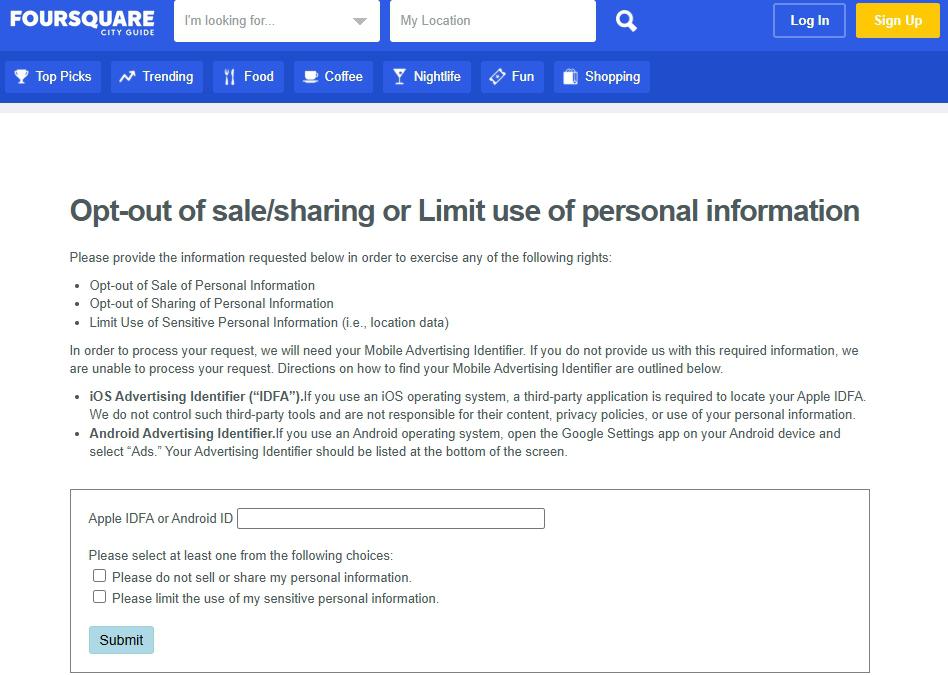
Foursquare opt-out page at app.foursquare.com/data-requests, still hosted inside the old FOURSQUARE CITY GUIDE branded web shell (the page keeps that branding although City Guide itself shut down) with its navigation bar at top (search dropdowns for 'I'm looking for...' and 'My Location', plus Top Picks, Trending, Food, Coffee, Nightlife, Fun, and Shopping tabs). Page heading reads 'Opt-out of sale/sharing or Limit use of personal information'. Body explains the three rights exercised (Opt-out of Sale of Personal Information, Opt-out of Sharing of Personal Information, Limit Use of Sensitive Personal Information i.e. location data) and notes that processing requires a Mobile Advertising Identifier. Two paragraphs of directions follow: iOS Advertising Identifier (IDFA) and Android Advertising Identifier. Below the prose sits a bordered form with a single 'Apple IDFA or Android ID' text input field, instruction text reading 'Please select at least one from the following choices:', two unchecked checkboxes labeled 'Please do not sell or share my personal information.' and 'Please limit the use of my sensitive personal information.', and a blue Submit button.
The whole opt-out is this page. Paste MAID, tick both checkboxes, click Submit.

Account deletion

Delete a personal Foursquare account

In-app settings

If you have a personal Foursquare account (from Swarm, the shut-down City Guide app, or a Developer account), the account deletion controls are separate from the MAID-based opt-out above. The MAID flow covers the device-level location data collected through SDK and apps; the account-deletion flow removes the personal profile (check-ins, mayorships, account details). To fully exit Foursquare you'll typically want both.

  • On the web (City Guide and Swarm accounts): Log in to your Foursquare account, open the Delete Account page, pick a reason and click "Delete Account", as Foursquare's City Guide sunset page describes. It deletes the account and its data from both apps and can't be undone.
  • In the Swarm app: Tap your profile in the upper left, tap the gear icon for Settings, scroll down and tap "Delete My Account", log in with your Foursquare details, enter the validation code, pick a reason and tap "Delete Account".
  • Developer account: Log into foursquare.com/settings, open Privacy Settings, and click "Delete your account".

City Guide and Swarm share the same Foursquare account. One "Delete My Account" action deletes your profile across both consumer apps. The Developer account is a separate object and uses the Privacy Settings path.

Account deletion doesn't cover the SDK / Movement data. Even after deleting your personal Foursquare account, location data collected from third-party apps that embedded the Movement SDK (formerly Pilgrim SDK) may still be tied to your device's MAID. The section 03 form is the right tool for that data; don't skip it just because you closed the City Guide / Swarm account.

Device controls

OS-level controls that prevent re-collection

Source-side prevention

The opt-out you submitted in section 03 stops Foursquare selling or sharing the data tied to your current MAID, but it doesn't delete the history Foursquare already holds. That takes a separate request to privacy@foursquare.com or the privacy service desk. To prevent new collection (from Foursquare and from every other location-data broker that buys from the same partner-app SDK ecosystem), the controls live at the OS level rather than at any single broker.

  1. Delete or disable your advertising ID. On recent Android versions, open Settings, then Google, then Ads, and choose Delete advertising ID. Do not reset it, because a reset creates a new ID that your earlier request does not cover. On iOS, follow Apple's steps to turn off app tracking.
  2. Revoke location permissions for partner apps. The Movement SDK is embedded in many third-party apps. On Android, open Settings, then Location, then App location permissions. On iOS, open Settings, then Privacy & Security, then Location Services. Deny location access when an app does not need it, and use While Using App instead of Always when possible.
  3. Uninstall Foursquare's consumer apps, meaning Swarm and any old City Guide or Marsbot app still on your phone. An installed app can collect data again.
  4. Use a browser that limits tracking. Brave, Firefox Focus, and DuckDuckGo Browser limit more tracking than the default browsers.

Confirm it worked

Did it actually work?

Indirect verification
  1. The form doesn't display a tracking number on submit and Foursquare doesn't run a public profile page you'd check, so confirmation is indirect. The statutory ceiling for an opt-out of sale or sharing is 15 business days under the CCPA regulations; the 45-day window, extendable once to 90, applies only to deletion, access and correction requests, which go through the service desk or privacy@foursquare.com.
  2. You won't see your data disappear from a public page because Foursquare doesn't publish your data to a public page - it sells aggregated and segment data to enterprise customers. The signals you'll see are downstream. Ads that previously targeted your visit history (e.g. retargeting after visiting a store) drop off, and the Pinpoint-derived audience segments stop including you.
  3. File an access request first if you want confirmation of what they had. CPRA gives California residents the right to ask for a copy of stored data before deletion, at most twice per 12 months. The app.foursquare.com/data-requests form cannot take that request, since it only has the identifier field and the two opt-out checkboxes, so email privacy@foursquare.com or open the Foursquare privacy service desk and ask for a copy of the personal information tied to your advertising ID and account.
  4. Re-run annually. Even with the OS-level controls in section 05, advertising IDs can rotate (or be re-collected through other channels). An annual re-submission keeps the opt-out current.

Troubleshooting

If it doesn't work

Common failures
  • The form rejects your MAID format. The expected format is a UUID (xxxxxxxx-xxxx-xxxx-xxxx-xxxxxxxxxxxx). Strip any whitespace and re-paste. If your iOS IDFA comes back as all zeros, that means app tracking is already turned off on the iPhone (Settings, then Privacy & Security, then Tracking) and Foursquare can't tie ad-network data to your device - in that case use privacy@foursquare.com to ask for a manual review referencing the apps you've used.

  • You're not sure if Submit worked. The page doesn't issue a confirmation number or email. The submission goes through silently if no error appears. If you want documentation, re-submit via privacy@foursquare.com naming the date and the MAID you provided.

  • Form fields aren't loading on your device. The page still sits inside the old City Guide web shell, which keeps its branding even though City Guide shut down, and depends on JavaScript - try a desktop browser if the mobile view is misbehaving, or disable strict tracker-blocking briefly while submitting.

  • You don't see any downstream effect after 15 business days. Email privacy@foursquare.com referencing your submission date and the MAID, and request a status update citing the CCPA / CPRA deadline.

  • You suspect partner apps are still sending your location. You can't identify every app that includes the Movement SDK. Tighten location permissions as described in section 05, and install only apps from publishers you trust with location data.

  • The Delete My Account flow fails for your consumer account. Email privacy@foursquare.com from the account email address and ask for manual deletion.

Stay off

Keep your data out of Foursquare (and the broader location ecosystem)

Annual re-check advised
  • Re-run the opt-out annually. MAIDs sometimes rotate; new partner apps come online; you may have switched phones. An annual re-submission is the maintenance cycle.

  • Foursquare is one of several. The location-data broker ecosystem also includes Cuebiq, Precisely PlaceIQ, Veraset, Gravy Analytics (subject to a 2024 FTC enforcement action), and the successor operations of Near Intelligence (defunct 2023) and X-Mode / Outlogic (also subject to FTC enforcement 2024). Opt-outs at those companies are separate.

  • Tighten location permissions across all apps (section 05). The MAID itself is moot if no app on your device can collect precise location in the first place.

  • Industry-wide settings help. The NAI no longer runs a one-click opt-out; its How to Opt Out page points to browser, phone and TV settings instead. Those complement the Foursquare-specific opt-out rather than replacing it, since they apply to interest-based advertising in general, not to your stored location records.

  • Consider the upstream apps you install. Apps that legitimately don't need always-on location (weather, social, shopping) but request it are the most common collection vector. Deny by default and grant only when needed.

Take yourself off data broker sites

Redact scans 120+ data broker sites from your device, finds where your details are listed, and submits the removal requests for you. If a broker relists you, it files again.

Last updated:

September 10, 2026