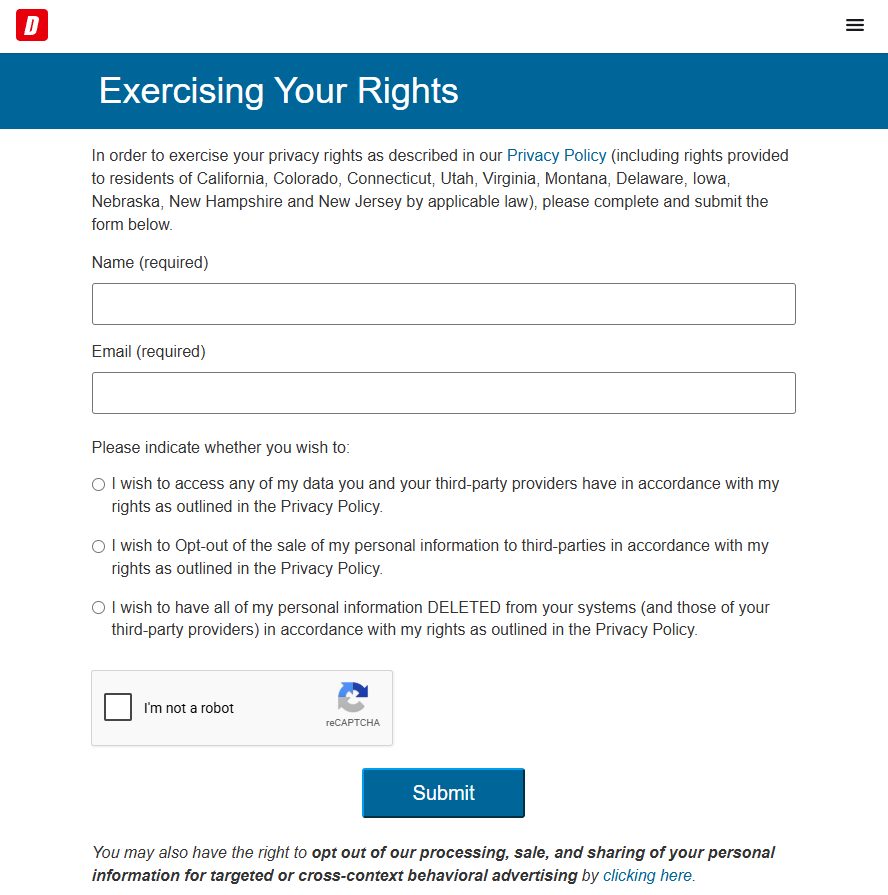
As painless as these get. Name, email, one of three options, a reCAPTCHA, Submit. Dice reports granting every one of the 453,710 deletion requests it received in 2024 and answering in a day. The real decision is which option to choose, because full deletion takes your job-seeker account with it. The second job is the advertising opt-out linked under the button.
Worth knowing: the Dice profile covers what a CV holds as broker data, including the immigration status its filing admits to collecting.
453,710 deletion requests in 2024, all granted, 1 day, as Dice reports
Also do
The advertising opt-out linked below the Submit button
Decide first
Which of the three you actually want
The three choices are mutually exclusive, and picking the wrong one is the only way to get an outcome you didn't intend.
Access returns what Dice and its third-party providers hold on you. A cheap first move if you've no idea what a decade-old CV still says, and Dice reports answering these in one to three days.
Opt out of the sale stops the onward selling while leaving your account and CV in place. The right choice if you're still job hunting. Dice reports 152,315 of these in 2024, all granted.
Delete asks for all of your personal information to be removed from Dice's systems and its third-party providers'. Expect it to take your job-seeker account and uploaded CV with it, so choose it when you're done with Dice, not mid-search.
If you want both a copy and a deletion, submit access first, wait for the reply, then submit deletion.
The form
Submitting it
01
Open the rights page
Go to dice.com/about/ccpa. The heading is Exercising Your Rights, and the intro names eleven states whose laws provide these rights, California, Colorado, Connecticut, Utah, Virginia, Montana, Delaware, Iowa, Nebraska, New Hampshire and New Jersey. The form doesn't check where you live, so anyone can submit. Living elsewhere affects whether Dice is obliged to act, not whether you can ask.
Name and email are all it asks for. The italic note under Submit is the second opt-out most people miss.
02
Enter the email your account uses
Name and Email are the only fields, and both are required.
Use the address attached to your Dice account, because that's how your record is found. For an account made years ago it may be an old personal address or a former work one, and if you can't remember which, that's a good reason to submit an access request first.
03
Choose your option and submit
Pick one of the three radio buttons, tick the I'm not a robot box, then press Submit.
The page won't send until the reCAPTCHA is ticked, so work through an image challenge if one appears. When it goes through, the form is replaced by Success! We'll be in touch shortly.
04
Do the advertising opt-out as well
Below the Submit button, in italics, Dice notes a further right to opt out of its processing, sale and sharing of your personal information for targeted or cross-context behavioural advertising, through a clicking here link. The form you just sent doesn't cover it. The link stays on the page and opens Dice's consent-preferences panel rather than another form, so make the choice there too. It's the most-missed step here because it sits under the button everyone is heading for.
Dice says it honours browser opt-out preference signals for advertising, but its privacy policy adds that the information it sells isn't linked to a browser identifier, so a signal alone doesn't stop the sales. Only the form does that.
Afterwards
What happens next
Dice reports a one-day mean and median on deletion requests, so confirmation should follow quickly. The request is written to reach Dice's third-party providers, not just Dice, where most brokers scope a deletion to their own systems and leave whatever they already sold in circulation.
It isn't permanent, and Dice's own policy is the reason. It says it may collect indexed content about you from public websites and search engines, may use that to append to or create a profile whether or not you have an account, and that it "cannot guarantee that we will not collect information from a publicly available source later". A new job search or CV upload undoes the deletion, and so does a public profile it indexes months from now. Re-check periodically.
Two things the form doesn't do. Inaccurate data goes to privacy@dice.com with the correction you want, or gets fixed inside your account. Limiting Dice's use of sensitive information, immigration status included, is an account setting rather than a form option, so log in and change it there while the account still exists.
Take yourself off data broker sites
Redact scans data broker sites from your device, finds where your details are listed, and submits the removal requests for you. If a broker relists you, it files again.
September 10, 2026 · Walked firsthand on August 18, 2026 and written from the screens rather than drafted first; the three options and their wording, the required fields, the reCAPTCHA, the eleven states and the advertising opt-out under the button are from that walk. The served form was read again on September 10, 2026 and matched it, down to the reCAPTCHA checkbox the page won't submit without. That read added that the advertising link opens a consent panel on the same page, plus the account-settings route for sensitive data, the privacy address and the opt-out-of-sale volume.