None of this is hard, but there are three forms. Two opt-outs on two different web addresses stop sale and sensitive use, and only one of them is on BIGDBM's state filing. Neither deletes anything. Deletion is a third form, at optoutccpa.com. All three are below, in order.
Background: the BIGDBM profile covers what identity data is, what BIGDBM's sensitive category contains, and the separate form it uses for deletion requests.
About five minutes for the two opt-outs, a few more for deletion
Requires
First and last name plus one of email, phone, or street address with ZIP
CAPTCHA
Invisible reCAPTCHA behind form one's Submit; a visible I'm not a robot box on form two
Agents
Both accept signed authorisation as a file upload, 10 MB cap
Their speed
3 days, mean and median, per its own filing
Form one
Do Not Sell or Share
01
Open the first form and choose your scope
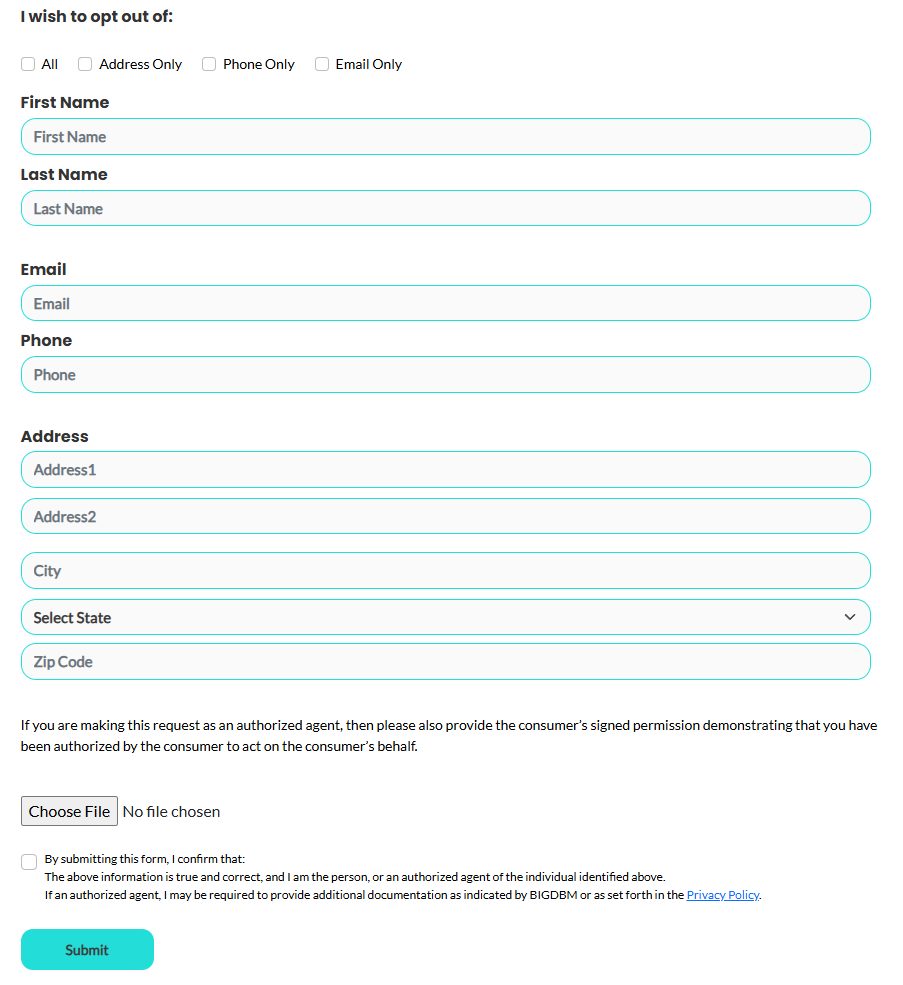
Go to optout.bigdbm.com, headed Do Not Sell or Share My Personal Information.
It opens with I wish to opt out of and four checkboxes, All, Address Only, Phone Only and Email Only. None is ticked for you, and the form won't submit until one is.
Tick All, which selects the other three as well. The narrower options exist for someone who wants to stop phone contact while staying reachable by post, and each makes its own contact field required. Choosing a single contact point leaves the rest of your record in circulation.
The scoping checkboxes at the top are unique to this first form. The second form has no equivalent.
02
Fill in every identifier you have
First Name and Last Name are required, and the form insists on at least one more way to match you, either Address1 with Zip Code, or Email, or Phone. It tells you so if you try to submit with less. Address2, City and State are optional.
Fill everything in anyway. BIGDBM's product is linking your name to all of your contact points, so every identifier you add gives the suppression something more to catch, and a phone number left out can survive as a separate linked record. If you've moved recently, submit again for the previous address.
03
Confirm and submit
If you're filing for somebody else, use Choose File to attach their signed permission. The upload is capped at 10 MB, and BIGDBM says an agent may be asked for further documentation.
Tick the confirmation box, which states the information is true and correct and that you're the person named or their authorised agent, then press Submit. An invisible reCAPTCHA runs when you press it, so there's no box to tick, but an image challenge can appear before the form goes through. The page also refuses automated browsers and records a browser fingerprint on submit, so if the button won't respond, try an ordinary browser rather than a privacy-hardened one.
Form two
Limit Sensitive Personal Information
01
Go to the second address
Now open optout-sensitive.bigdbm.com, headed Limit the Use of My Sensitive Personal Information. The first form links to it only from its footer, and it's absent from BIGDBM's state filing. It's a separate right, not a repeat submission, so completing form one has no effect here.
The page quotes the CPRA's definition of sensitive data and says BIGDBM may acquire and process data in those categories without soliciting it; the privacy policy narrows that to race, national origin, religion and ancestry. Since you can't tell which apply to your record, file it regardless.
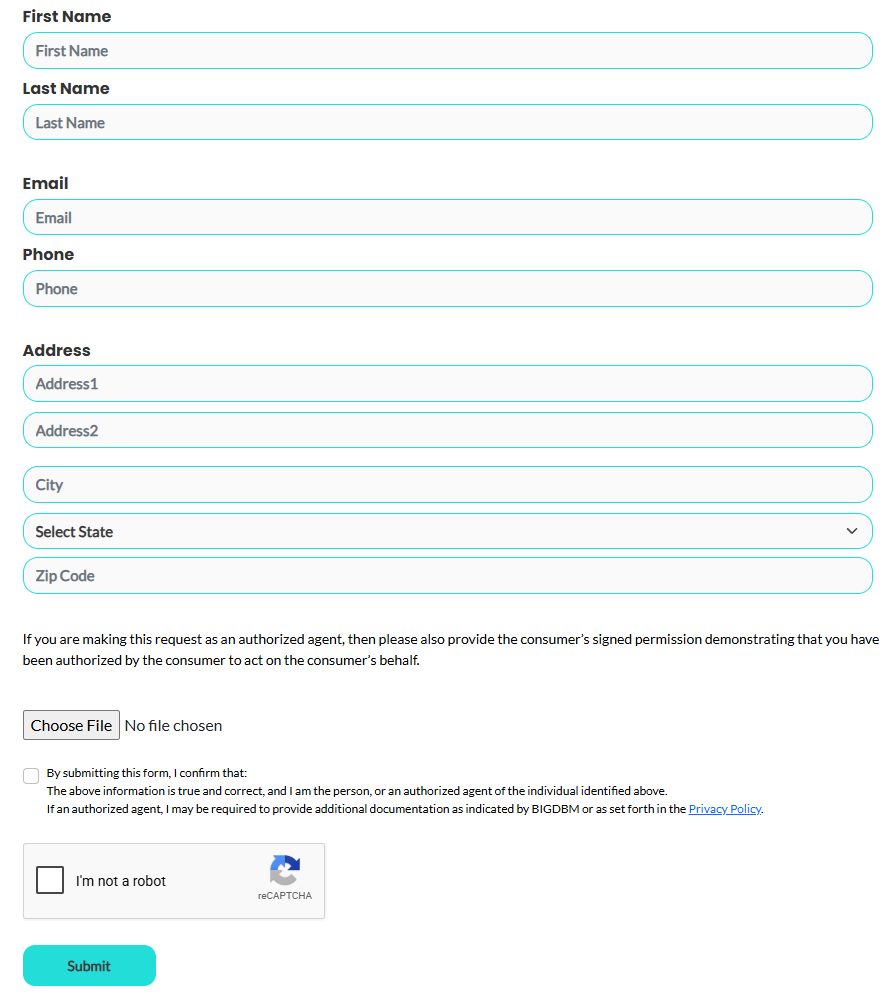
Same fields as form one, minus the scoping checkboxes and with a visible reCAPTCHA above Submit.
02
Repeat the same details, then clear the CAPTCHA
The fields and the rules are identical to the first form, so it's name plus at least one of email, phone or address with ZIP, with the same agent upload and confirmation checkbox. Enter exactly what you entered before, so both requests resolve to the same record.
This form shows an I'm not a robot reCAPTCHA above the button, so tick it and work through any image challenge before pressing Submit. If it complains that the CAPTCHA failed, tick it again and resubmit.
Form three
Ask for deletion
01
Open the Consumer Rights Requests form
Go to optoutccpa.com, headed Consumer Rights Requests and carrying BIGDBM's logo. BIGDBM's privacy policy is what sends deletion and right-to-know requests there, and neither opt-out form above does either job.
Its three checkboxes are Right to Delete, Right to Know Categories of Information and Right to Know Specific Pieces of Information. Tick Right to Delete, and add the two right-to-know boxes if you'd like to see what BIGDBM holds as well.
02
Enter the same details and submit
First Name and Last Name are required. Give the same email, phone and address you used on the opt-out forms, so all three requests land on one record.
The Agent Email and Agent Verification Code boxes and the file upload are for someone filing on your behalf, so leave them empty if it's you. Tick the confirmation box, clear the reCAPTCHA and submit.
Afterwards
What to expect
BIGDBM is good at this part. It told California it received 380,900 deletion requests in 2024 and granted 380,772 at a three-day mean and median, through an automated suppression process wired into an internal opt-out database. It also denied 128, without saying why, so a request here isn't automatically guaranteed.
Keep your own record. No form issues a reference number on screen, so note the date and screenshot each one before submitting, and keep them separately so you can tell which right you exercised if you ever follow up with privacy@bigdbm.com or the toll-free line on 1-844-693-2820.
There's nothing to re-check by searching, because identity data is never published. The realistic signal is indirect. Fewer companies appear to already know who you are when you've given them nothing.
Take yourself off data broker sites
Redact scans data broker sites from your device, finds where your details are listed, and submits the removal requests for you. If a broker relists you, it files again.
September 10, 2026 · Both forms were walked firsthand on August 18, 2026 and this guide was written from those screens the same day, which is where the scoping checkboxes on form one, the shared field set, the agent-authorisation upload and the confirmation checkbox come from. Today's read of the served HTML of both forms confirmed all of that, added the identification rule (name plus one of email, phone or address with ZIP) and the 10 MB upload cap, and found an invisible reCAPTCHA bound to form one's Submit button that the August walk didn't have; form two's visible reCAPTCHA is unchanged. That only optout.bigdbm.com appears on the California filing was re-checked against the registry CSV today. The deletion form at optoutccpa.com hasn't been walked; its fields are read from its served HTML on September 10, 2026.