How to remove yourself from Advanced Background Checks
Redact removes listings automatically
AdvancedBackgroundChecks.com (operated by Confi-Chek, Inc.) runs its own self-service opt-out. Submit your email, click the verification link they send, fill in a short identity form (name, DOB, address, phone), and submit. About 5 minutes total, and in our testing results show up in 3-7 days.
Don't treat this as clearing the sister sites. Confi-Chek operates the properties listed in the profile's network section (PeopleFinders, USPhoneBook, CriminalSearches, MyRelatives, PeopleSearchNow, Enformion, FastPeopleSearch). The ones outside Mississippi Tornado Alley's California filing each need their own request. For the domains that filing does cover, the operator claims one request applies across all of them for the sale of personal information, and we haven't verified that. Either way, run each brand's own opt-out in turn and re-check.
Prereqs
What you'll need before you start
5 things
Unlike most people-search opt-outs we've worked through, this one asks for a full set of identifying details rather than a name search. Have these on hand before you start so you don't have to pause mid-flow.
Required:
First name and last name.
City, state, and ZIP code where the listing places you.
An email address you can access. You'll receive a verification email; the link expires in 24 hours.
Optional but recommended (improves the chance Confi-Chek's system matches and actually suppresses your record):
Middle name or initial.
Date of birth.
Phone number.
Street address (most useful for matching - the broker's listing usually includes street-level data).
Heads up: more PII than most opt-outs we've documented. You're handing a data broker your DOB, full address, and phone in order to remove yourself. Confi-Chek almost certainly already has this information from public records, but it's still ironic. The acknowledgement email is explicit: "if our system can not match the information provided to a record, it will not be opted out" - so skimping on the optional fields can mean your removal silently doesn't take.
I'd recommend a disposable email. A throwaway address (Gmail +alias, ProtonMail, SimpleLogin) instead of your primary inbox keeps you off any marketing lists data brokers sometimes feed contact emails into. The flow works the same with any deliverable address.
The 6 steps
Remove your listing
~5 minutes total
Each step has an image slot below it - drop in a screenshot once you have one.
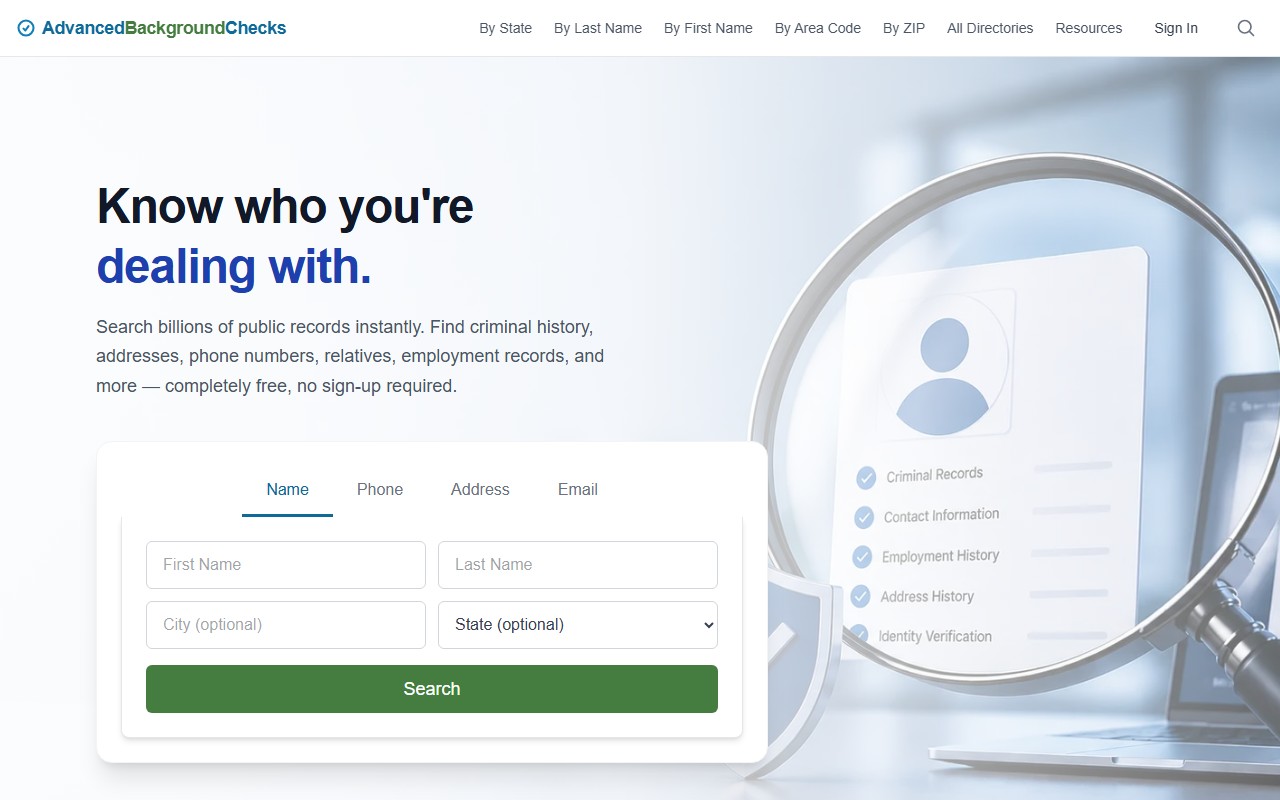
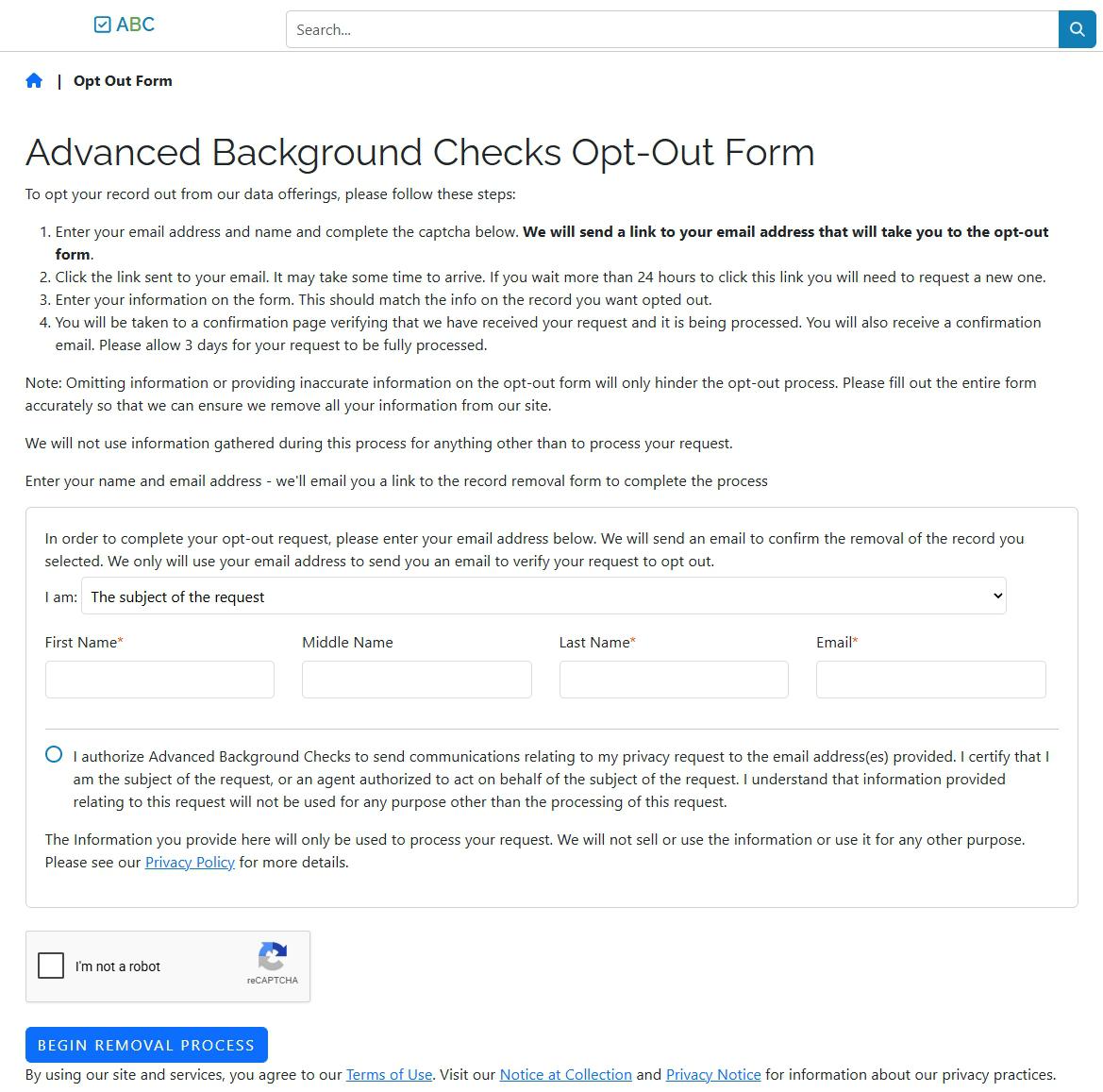
The opt-out portal at advancedbackgroundchecks.com/removal - the same page whether you visit directly or click "Do Not Sell My Personal Information" in the footer.
02
Submit your initial removal request
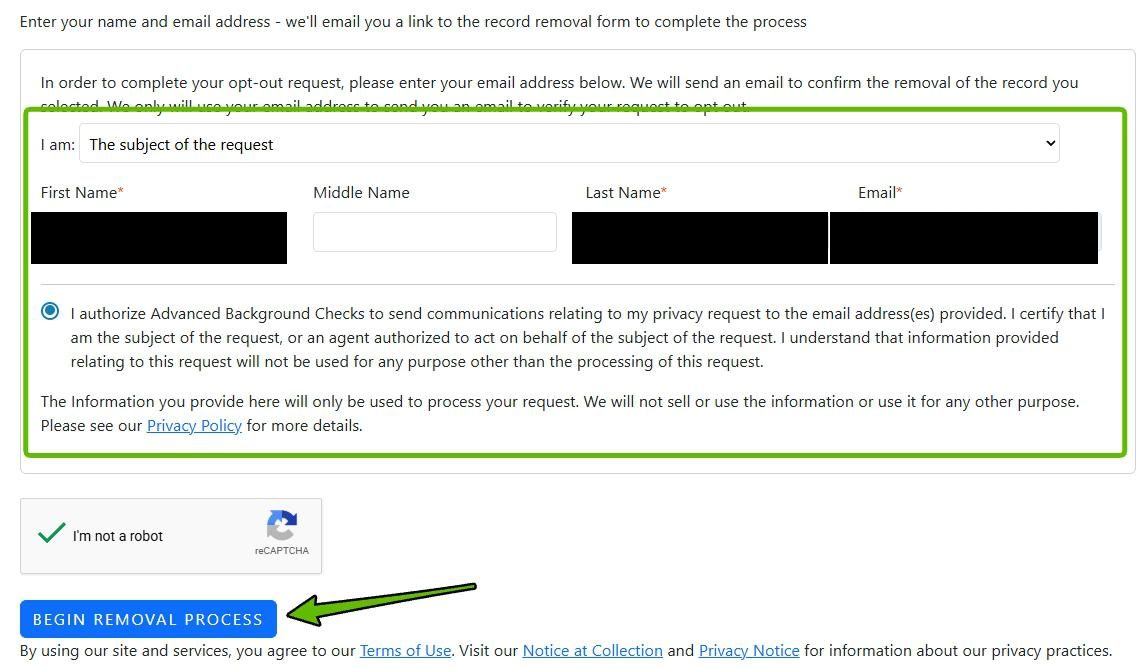
In the form fields, fill in your First Name, Last Name, and Email (Middle Name is optional). Leave the "I am:" dropdown set to "The subject of the request". Tick the authorization checkbox, complete the "I'm not a robot" CAPTCHA, then click "Begin Removal Process".
This first form doesn't yet identify which record to remove - it just kicks off the email-verification flow that gets you to the identity form in step 4.
Use an email you can check immediately - the verification link expires in 24 hours.
03
Verify your email
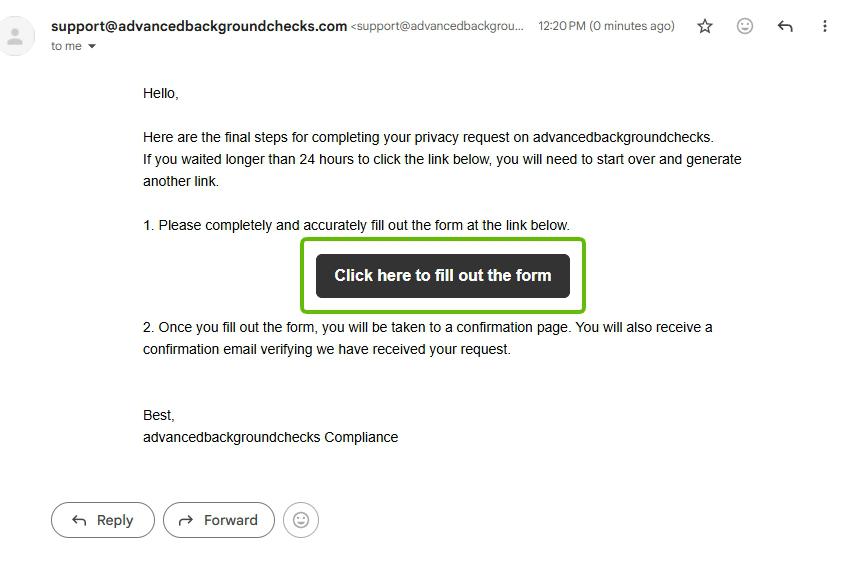
Check the inbox you used in step 2. You'll get an email from support@advancedbackgroundchecks.com with a dark button labeled "Click here to fill out the form". Click it.
If you don't see it within a few minutes, check the spam/junk folder. The link is single-use and expires in 24 hours - if you wait longer than that, start over from step 1.
Clicking the button opens the identity form (step 4).
04
Fill in the identity form
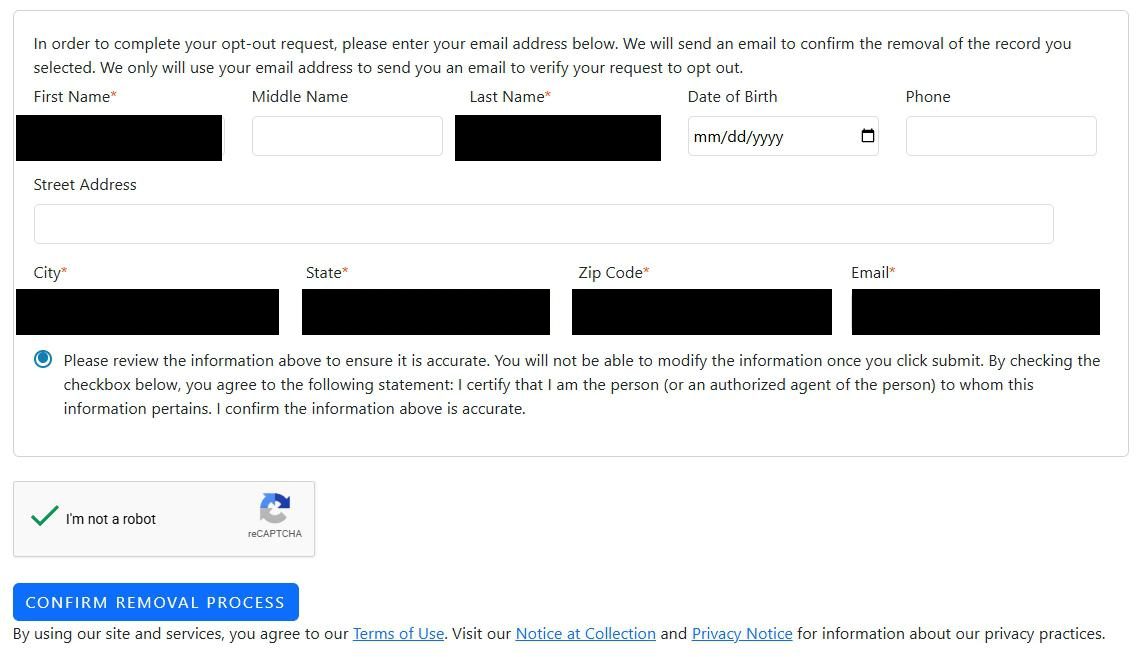
The verification link opens an identity form - not a search results page. Confi-Chek matches your submitted identity against the records they hold, so they ask for a fairly complete set of details.
Required fields (marked with red asterisk on the form):
First Name
Last Name
City
State
Zip Code
Email (same one you verified in step 3)
Optional fields (asked but not enforced):
Middle Name
Date of Birth
Phone
Street Address
Filling in the optional fields makes Confi-Chek's matching more reliable - the acknowledgement email explicitly warns that "if our system can not match the information provided to a record, it will not be opted out." Give them as much as you're comfortable with.
Tick the attestation checkbox ("I certify that I am the person... I confirm the information above is accurate"), solve the CAPTCHA, then click "Confirm Removal Process".
Note the warning above the attestation: you can't modify the info after clicking submit.
You can't edit after submitting. The form explicitly warns: "You will not be able to modify the information once you click submit." If you spot a typo after submitting, you'll have to restart the entire flow from step 1 - new email, new verification, the works.
Use the address Confi-Chek likely has on file, not necessarily your current one. If you've moved recently, the data broker may still have your previous address indexed. Match what you'd expect on the public listing for the best chance of a hit.
Sealed records, screenshot anything visible: if at any point in the flow you see criminal data you believe was expunged or sealed, take a full screenshot before submitting. Confi-Chek has been sued under the FCRA for publishing sealed records (Garza et al. v. Confi-Chek, 2018), and a screenshot is useful evidence if you need to escalate.
05
Confirmation - request submitted
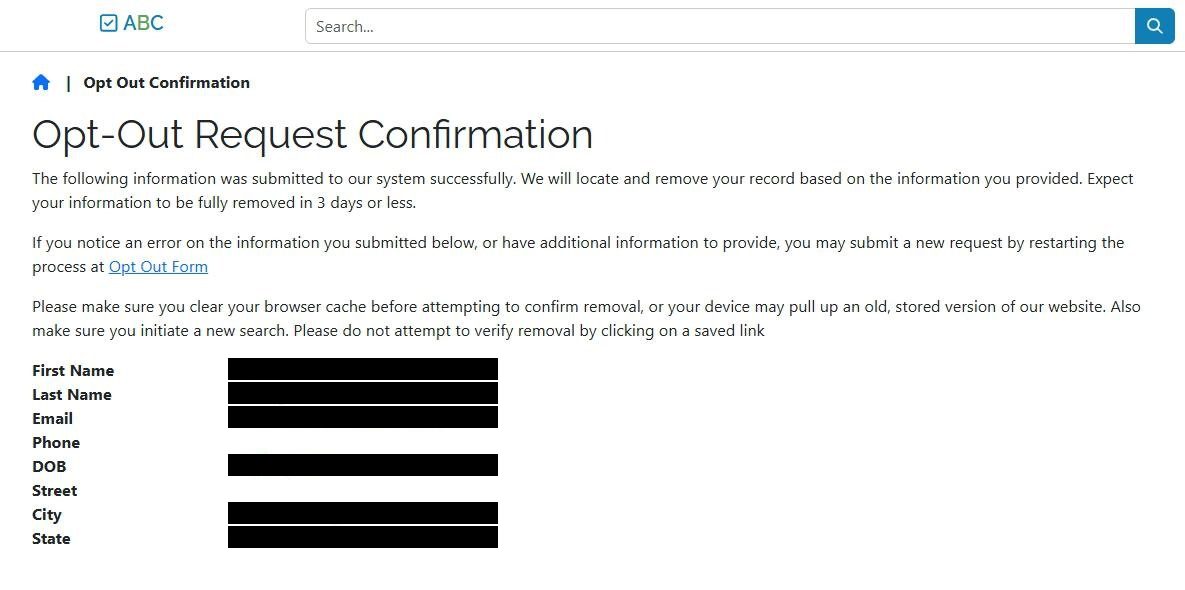
After you submit, the site shows an Opt-Out Request Confirmation page. It echoes back the details you submitted and states: "We will locate and remove your record based on the information you provided. Expect your information to be fully removed in 3 days or less."
Your removal request is now in - no further clicks required on this page.
The confirmation page echoes your submitted info and gives the 3-day removal timeline.
Don't trust browser cache to verify removal. The confirmation page explicitly tells you to "clear your browser cache before attempting to confirm removal", otherwise you may see a stored version of your old listing. When you check in step 4 of the "Confirm it worked" section below, do it in a private / incognito window or after clearing the cache.
06
Watch for the acknowledgement email
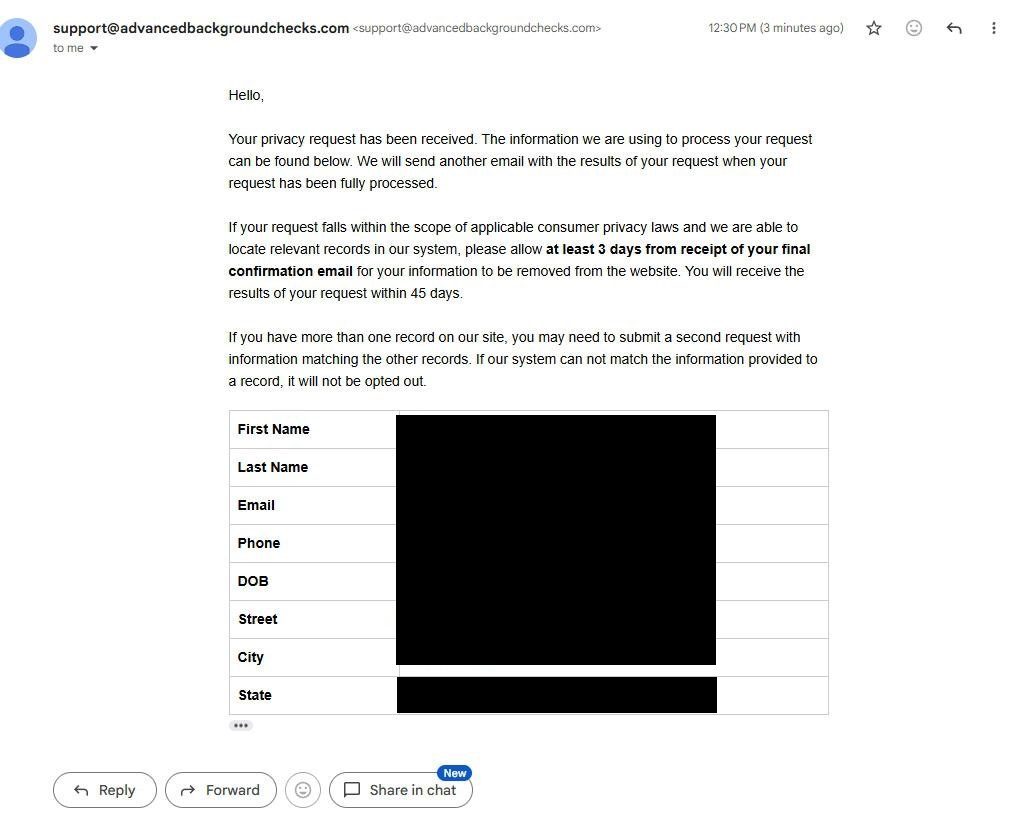
Shortly after you submit the form, support@advancedbackgroundchecks.com sends an acknowledgement email confirming the request was received. There's nothing you need to do here - no link to click, no action required. It's a paper trail and a timeline.
The email contains three useful pieces of information:
A summary table echoing back every field you submitted (good for verifying what got recorded against you).
An explicit timeline: "please allow at least 3 days from receipt of your final confirmation email for your information to be removed from the website. You will receive the results of your request within 45 days."
A warning that multiple records require multiple submissions: "If our system can not match the information provided to a record, it will not be opted out."
A third email is also promised when the request is fully processed (the "results of your request" email, within 45 days). Watch for that separately - it's the final confirmation.
No action required. This is the paper trail for the request you submitted in step 5.
Save both this acknowledgement and the eventual results email. Timestamped emails from the broker are the dated evidence trail of your request - keep them in case the removal doesn't actually happen.
Confirm
Confirm it worked
Wait 3 days
Wait at least 3 days after the acknowledgement email arrives, then go back to advancedbackgroundchecks.com and search for yourself with the same name + city/state from step 4.
We recommend checking in an incognito / private browser window, or clearing your browser cache first. The confirmation page explicitly warns that cached results may show the old listing even after it's been suppressed - in our experience that's the most common reason people think the opt-out didn't work.
A separate "results of your request" email also arrives from support@advancedbackgroundchecks.com within 45 days, confirming the outcome on Confi-Chek's end. I'd suggest saving it as evidence in case you need to escalate later.
Success looks like: the record you removed no longer appears in AdvancedBackgroundChecks.com search results (verified in a fresh browser session), and the "results of your request" email confirms the removal.
If it fails
Troubleshooting
5 fallbacks
Verification email never arrived. Check spam/junk. If it's still missing after 30 minutes, the email may have been mistyped or your mail provider may be filtering it. Start over from step 1 with a fresh email (a Gmail +alias or disposable address often works better than corporate inboxes).
Verification link expired. The link expires in 24 hours. If yours expired, just restart from step 1 - there's no penalty for re-submitting.
Form rejected or no record matched. If you submit the identity form in step 4 and the system says it can't find a matching record, try the form again with variations - middle initial vs. full middle name, current vs. previous address, maiden / hyphenated last name. Confi-Chek matches against what's on file, not against what's correct.
Listing still appears after 7 days. We'd recommend emailing privacy@advancedbackgroundchecks.com with the URL of the record and your removal-request details, asking for a manual escalation. Cite a CCPA (California) or GDPR-equivalent deletion right if applicable - the company is required by California law to honor verified consumer deletion requests.
Sealed records still showing. If your record displays criminal data you believe was expunged or sealed, this is a potential FCRA violation - the same theory as the 2018 Garza et al. v. Confi-Chek federal class action. Email privacy@ above with the specific records, and keep dated screenshots of the listing.
Stay off
Keep your record off the site
Quarterly check
AdvancedBackgroundChecks.com refreshes its dataset from public records on a continuous cycle. A new address, phone number, or other public-records hit will create a new record - even if you successfully removed an older one.
We recommend re-checking every 3 months. Search the site for your name and any prior cities. If a new record appears, repeat steps 1-6 to suppress it.
And remember - this site is only one of 8 Confi-Chek properties. Each has its own opt-out flow. Our sister-sites list on the profile page has links to all of them.
Doing this across every broker? AdvancedBackgroundChecks is one of ~120 active US people-search and background-check sites. Manual removal across all of them takes 20-40 hours per pass. Redact's data broker removal product runs and re-checks all the requests for you.
Take yourself off data broker sites
Redact scans data broker sites from your device, finds where your details are listed, and submits the removal requests for you. If a broker relists you, it files again.