How to Automatically Delete Discord Messages
 Dan Saltman
On this page
Discord has no setting that deletes your messages automatically, so inside Discord itself your only option is to delete your own messages one by one. Redact's Disappearing Mode removes your Discord messages once they reach an age you set, and its mass delete tools take out the history you already have in one run.
There's no need for your Discord history to pile up forever. With Redact's Disappearing Mode for Discord, your messages are deleted automatically after a set amount of time, so you never have to think about it again.
Apps such as Telegram, Snapchat, and Signal made disappearing messages popular, and Redact now brings the same power to your Discord servers and private DMs. Old conversations clean themselves up, and the clutter never comes back.
Disappearing Mode was built to auto-delete Discord messages and remove old chats on a timer. Below, you'll find Discord's own method first, then Disappearing Mode, and after that the Redact steps for deleting messages you've already posted.
How to delete Discord messages in Discord (the normal way)
Checked on the Discord desktop app, November 2026
Discord doesn't offer a timer, a disappearing messages setting, or a delete all button for your own messages, whether in servers or in DMs. If you search its settings for "delete", nothing about messages shows up. What it does offer is a search that finds the messages you posted, plus a Delete Message option on each one, and since that search only covers the server or DM you're in, you'll need to repeat these steps everywhere you've posted.
Step 1 Search for your own messages
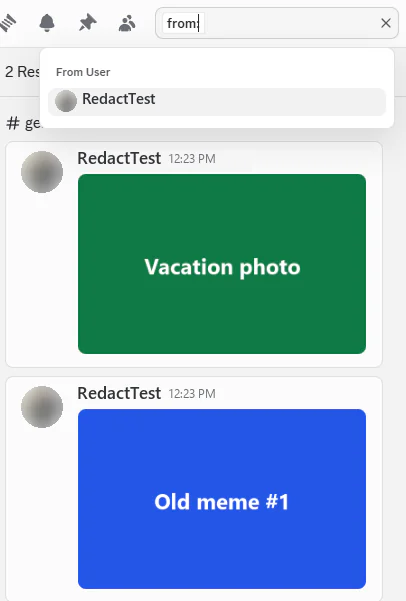
Open the server or DM, click the search box in the top right, type from: and pick your own account from the list.
Step 2 Jump to a message
Press Enter to list every message you've posted there. Hover over a result and click Jump to open that message in the chat. A message you've just sent may take a little while to show up in search.
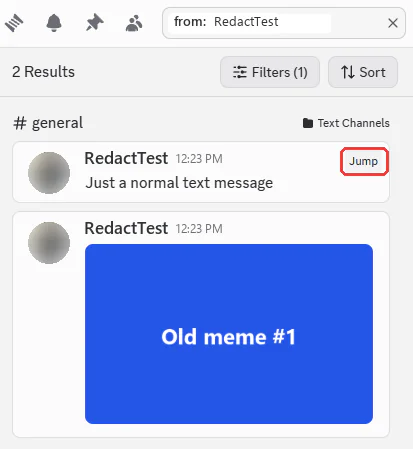
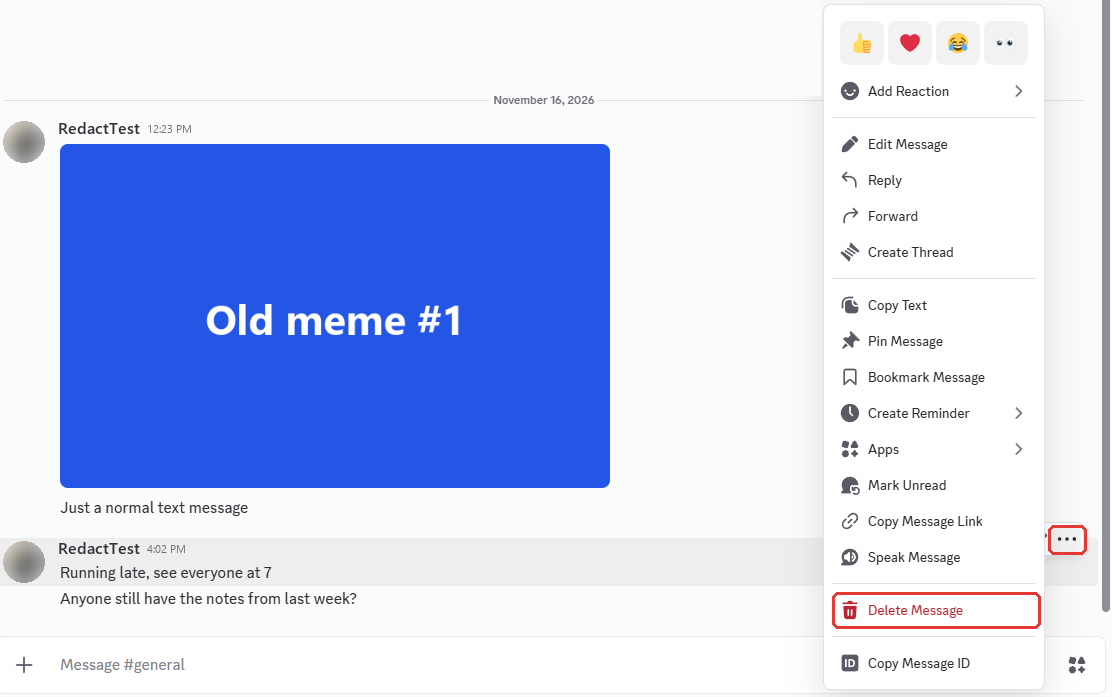
Step 3 Choose Delete Message
Hover over the message, click the three dots at the right end of its toolbar, and choose Delete Message.
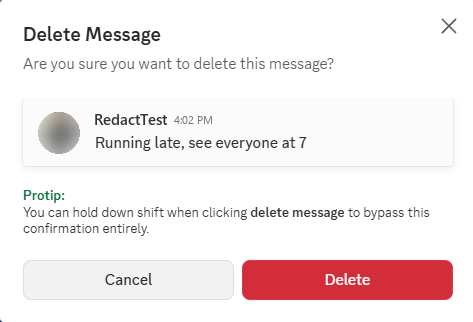
Step 4 Confirm the delete
Click Delete. Discord's own tip in this box points out that holding Shift while you click Delete Message skips the box, which saves time as you go back to your search results and repeat this for each message.
You'll know it worked when the message vanishes from the chat right away, though your search results may keep listing it until you search again.
That works for a handful of messages, but nothing in Discord deletes them for you later. Redact can do that on a timer or all at once.
| Discord's own way | Redact | |
|---|---|---|
| Automatic deleting | None | Disappearing Mode, on a timer you set |
| Where it looks | One server or DM at a time | Every server, channel and DM you pick |
| Deleting | One message at a time | Everything that matches, in one run |
| Filters | from:, dates and keywords | Message types, date range and keywords |
| Check first | Jump to each message | Preview Mode |
What is Disappearing Mode?
Checked on Redact 0.21.32 for Windows, November 2026
Disappearing Mode is an automatic deletion system that lets you set rules for how long your Discord messages stay visible before Redact removes them, and you choose both where they're deleted from and how long they stay online.
What Disappearing Mode can do on Discord:
- Auto-delete your messages in the servers, channels, or direct messages you pick
- Keep each message for as little as one hour, or for days or weeks
- Leave what you've already posted alone and delete only new messages, or include older ones as well
- Check for messages to delete once a day, four times a day when you keep messages for two days or less, or every hour
Disappearing Mode for Discord is part of Premium, and Redact needs to be open or sitting in your system tray for its deletes to run.
How to Set Up Disappearing Mode
Step 1 Open Disappearing Mode and pick Discord
First, download Redact if you haven't already, and connect your Discord account. Your Discord password goes straight to Discord, so we never see or store it. Then go to Disappearing Mode › Discord from the menu on the left (Discord sits under Premium).
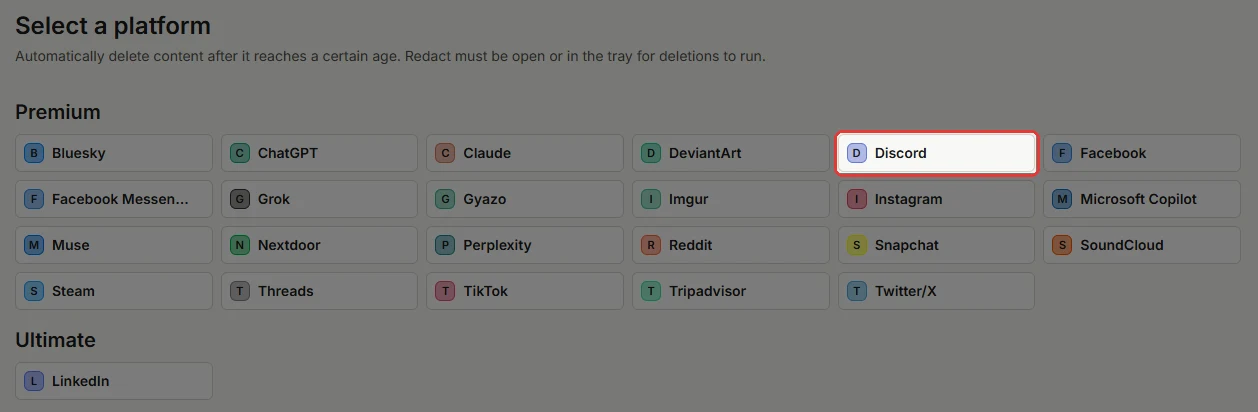
Step 2 Pick your servers, channels or DMs
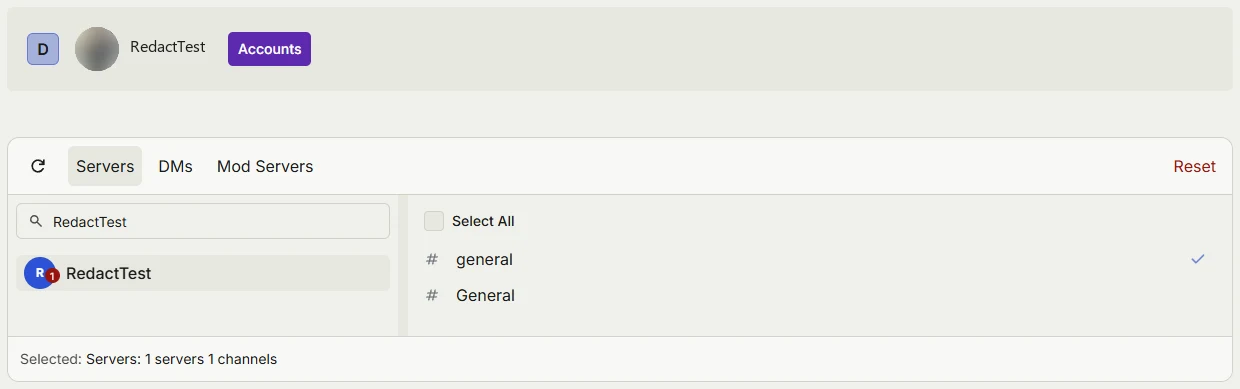
Use the Servers tab to pick a server and then the channels in it, or switch to DMs to pick conversations. Select All ticks every channel in a server at once, while the Mod Servers tab is for servers you moderate.
Step 3 Set how long messages stay, then click Create
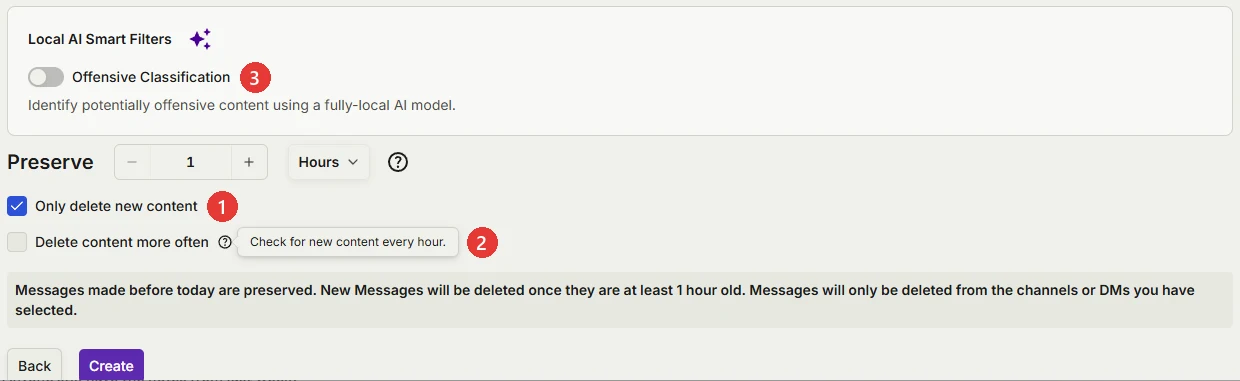
Next to Preserve, set how long your messages stay before Redact deletes them, in hours, days, or weeks, with one hour as the shortest.
- Only delete new content starts out checked, so everything you posted before you click Create stays where it is and only new messages disappear. Uncheck it if you also want older messages deleted once they pass your time limit.
- Delete content more often shows up when you keep messages for one day or less, and it looks for messages every hour instead of four times a day. Rules that keep messages for more than two days are checked once a day.
- Offensive Classification, under Local AI Smart Filters, narrows the rule to messages an AI model on your own computer flags as offensive. Leave it off to delete everything in the places you chose.
The box under these options spells out what your rule will do. Once it looks right, click Create, and Redact keeps deleting your Discord messages by that rule from then on.
How to mass delete your Discord messages automatically with Redact
Disappearing Mode handles messages from now on. To delete the Discord history you already have, whether all at once or only what matches keywords, dates, the places you posted, or the people you mentioned, use Redact's Discord page. The free plan covers your last 30 days, and your full history needs Premium.
Before you start, have Redact open and your Discord account connected, as in Step 1 of the Disappearing Mode setup above.
Step 1 Open your Discord account
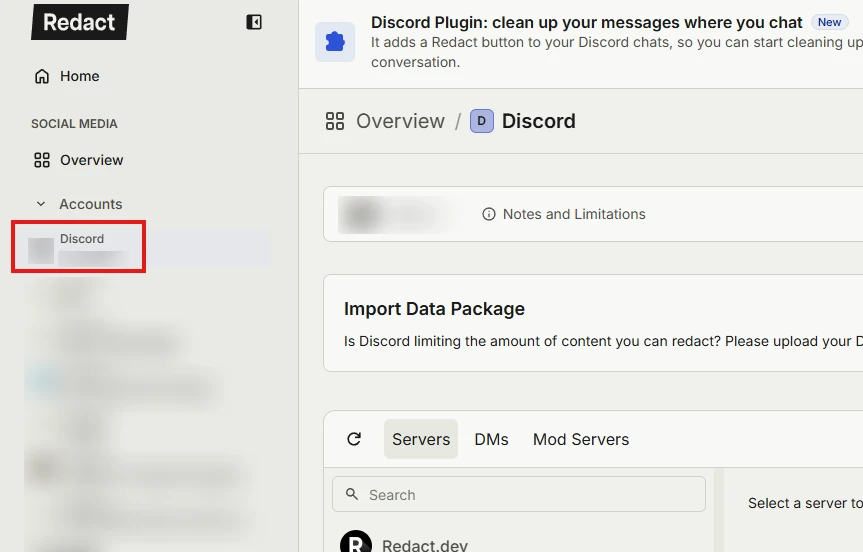
In Redact's sidebar, click your Discord account to open its Discord page.
Step 2 Select the Advanced tab
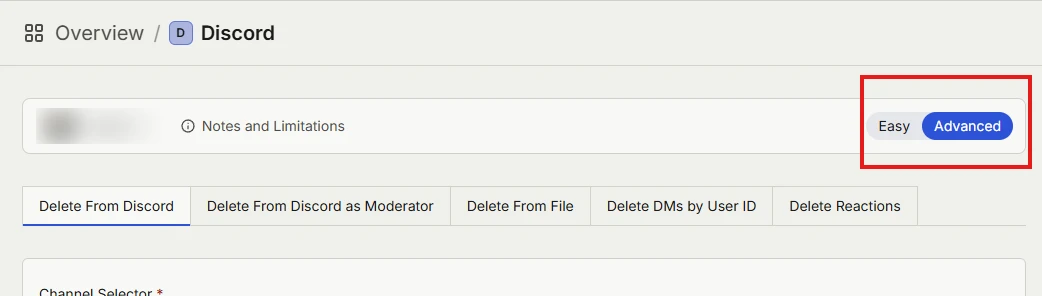
Choose Advanced in the top right corner of Redact's Discord page.
Step 3 Choose servers or DMs
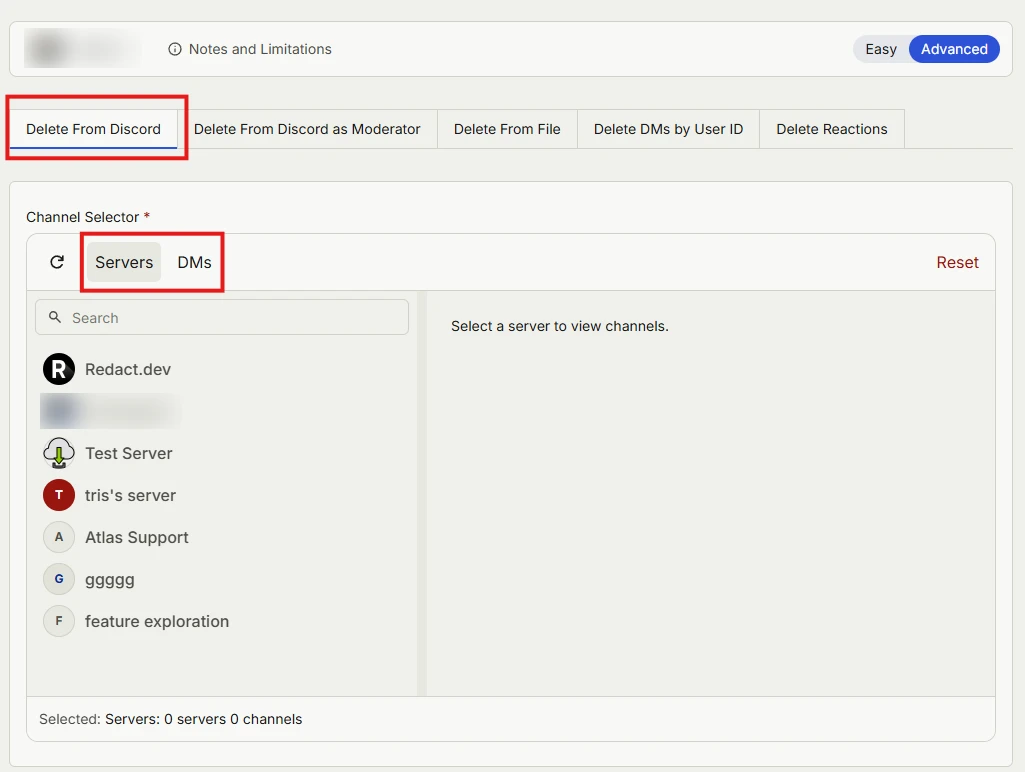
Leave the first tab, Delete From Discord, selected. The other tabs cover deleting as a server moderator, deleting from your Discord data file, deleting DMs by user ID, and deleting your reactions. Lower on the page, pick whether to search servers or DMs.
Step 4 Pick your servers and channels
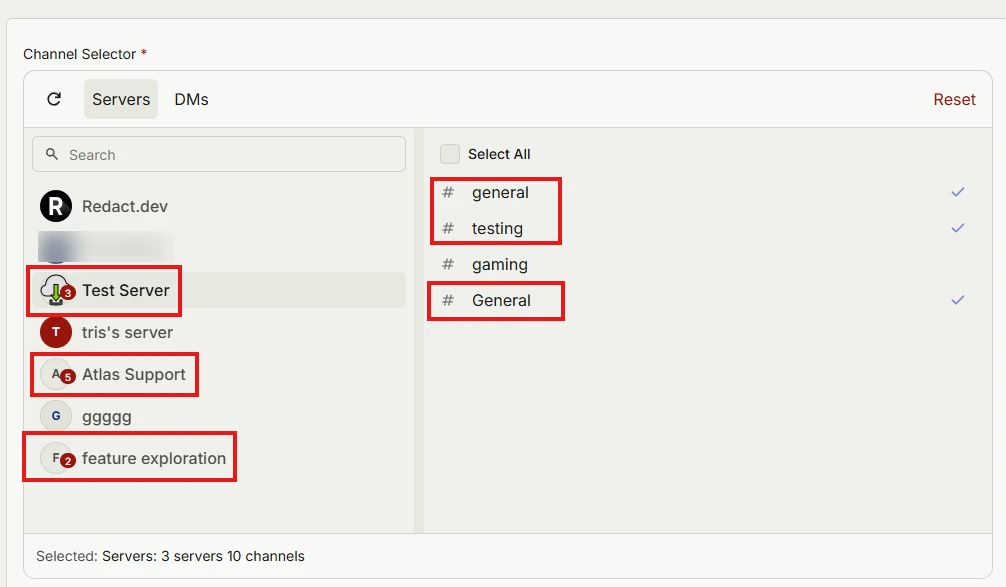
Select the servers you want to delete messages from, and once you pick one, Redact lets you choose individual channels inside it.
Step 5 Set the date range
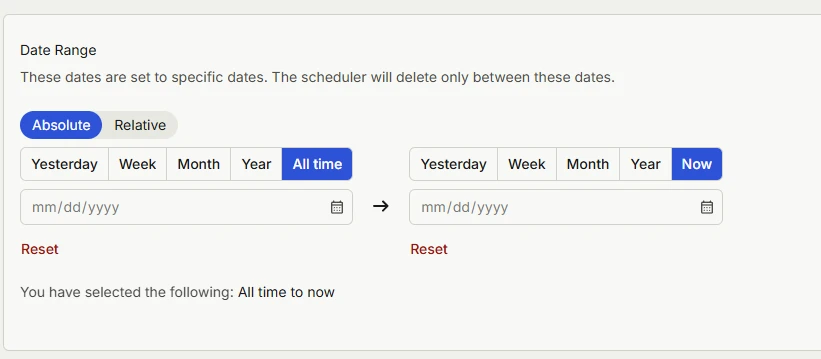
The date range runs from "All time" to now by default. Leave it as is to delete all your messages, or narrow it to a particular stretch of time.
Step 6 Choose what to delete
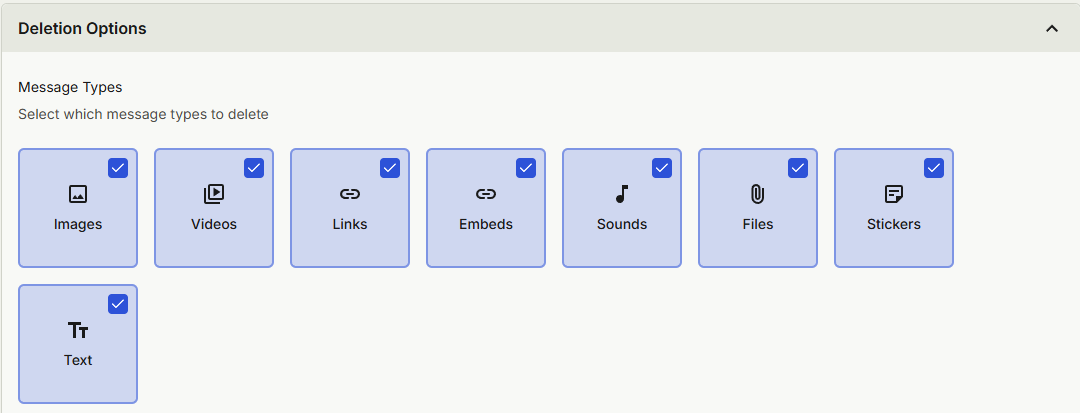
Under Deletion Options, every message type is already checked: images, videos, links, embeds, sounds, files, stickers and text. Leave them all checked to delete every message, or uncheck the types you'd rather keep.
Step 7 Fine-tune your filters
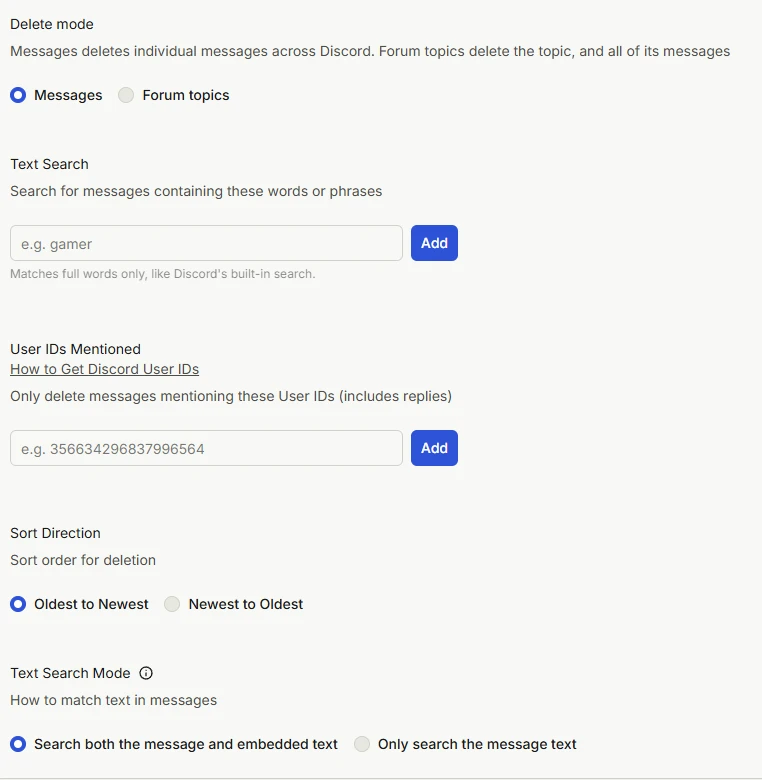
These filters are optional. Text Search deletes only messages that contain the words you type, and User IDs Mentioned deletes only messages that mention those users. Sort direction decides whether Redact starts with your newest or oldest messages, which is handy when you have a long history. Delete mode stays on Messages, since Forum topics deletes a whole topic along with every message in it. Premium is needed for delete mode, user IDs mentioned and sort direction.
Step 8 Pick how to handle what Redact finds
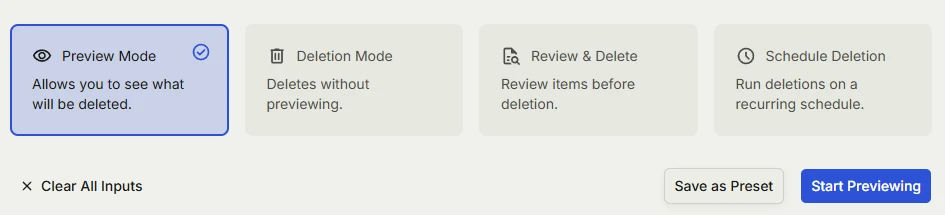
Run Preview Mode a few times first. It lets you adjust your search and do dry runs, and a bulk wipe that catches the wrong thing is the last thing you want.
- Preview Mode lists everything Redact would delete without deleting any of it.
- Deletion Mode deletes everything that matches your filters.
- Review & Delete lets you look through what Redact found and pick what to delete, though it needs Local Archive switched on in Settings.
- Schedule Deletion repeats the same cleanup on a schedule, such as one server every Sunday night or your whole Discord history every day at midnight.
Deletion Mode can't be undone. Once it runs, those messages can't be recovered, so run Preview Mode first.
That's it. If you get stuck, hop on our Discord or email support@redact.dev. Redact also works with most other mainstream social media sites.
Why You Should Auto-Delete Old Discord Messages
There's a lot to like about auto-deleting Discord messages.
- Better privacy. Old conversations don't stick around forever, so there's less risk of leaks or unwanted rediscovery.
- Tidier servers and DMs. Clutter doesn't build up to begin with.
- Less liability. Jokes, opinions, or sensitive conversations won't resurface to haunt you years later.
- Rules that fit each space. Set cleanup rules that suit each server or DM you're in.
You still say whatever you want. Your old messages just come with an expiration date.
Tips for managing your Discord history
- Back up what matters. Save any conversations or shared files you really want to keep before you delete.
- Share less going forward. From now on, think twice before posting sensitive details or files in Discord chats.
Ready to start?
Download Redact at redact.dev and set up auto-deletion for Discord today. Want to auto-delete posts on other social sites as well, such as Twitter, Bluesky, Reddit, and Facebook? Take a look at this tutorial.
Automatically Delete Discord Messages FAQ
Can I auto delete my Discord messages inside the Discord app without tools?
Discord has no built-in auto delete for all your past messages. You can delete them one at a time, but automating it takes a helper tool or bot you control.
What types of Discord content can be removed during cleanup?
Direct messages with users, messages in servers and channels, replies, threads, attachments, embeds, and reactions you added.
How do I connect Redact to Discord to start automatic deletion?
Open Redact and choose Discord. Sign in, select Servers and DMs, pick target channels, then set filters. Run a Preview first, and when you're ready, switch on Deletion or a schedule.
Which filters can Redact apply for Discord auto deletion rules?
Filter by date ranges, servers, channels, keywords, and content types like attachments and links. Redact acts only on your own content, so nothing anyone else posted gets touched.
What modes does Redact provide for Discord cleanups and automation?
Use Preview to list matches with no changes, Deletion to remove all matches, Review & Delete to approve items, and Schedule Deletion to run on a repeat cadence.
Can I auto delete messages only in certain servers or channels that I pick?
Yes. Target specific servers, categories, channels, or DMs, and if you need separate policies, save different rule sets for work and personal servers.
Does Redact store my Discord credentials or message content on its servers?
No. Redact runs on your device and uses only the minimum access it needs to carry out your actions. You can disconnect Discord from Redact at any time.
Will auto deletion remove attachments and embeds that my messages created?
Deleting a message removes it along with the Discord-hosted attachments tied to it, but files copied elsewhere or links to external hosts can stay outside Discord.
How does Redact handle Discord rate limits or very large chat histories?
Redact batches its actions and spaces out requests to respect rate limits. For long histories, run it in date slices or schedule several passes so it stays stable and covers everything.
Can I keep new messages clean automatically going forward after a first pass?
Yes. Save your filters and switch on a schedule, like daily or weekly, and Redact will run the same rules and remove matches as they build up.
Can Redact target only my messages and skip messages from others in the channel?
Yes. Redact only acts on content your account posted, so other people's messages in the channel are never touched. The only exception is Mod Servers, where moderators can clean up other members' messages in servers they run.
Will deleting messages change server roles, bans, or permissions for my account?
No. Deleting messages doesn't change roles, bans, or server settings, which server admins manage.
Is there a free option in Redact for Discord or do I need Premium to run all time?
You can start free with recent history on supported services, then upgrade to Premium to process all-time data and get advanced filters and scheduling.
What's the safest workflow to avoid mistakes with automatic deletion on Discord?
Export or save important threads, run a small Preview, set preservation rules for anything that must stay, approve a short Review & Delete batch, then widen your ranges once you've confirmed the results.
Is Redact easy to try for Discord, and how do I sign in securely?
Redact is free to download, and you can start with recent history. Redact uses passwordless sign-in with secure email codes. You can disconnect at any time and upgrade later for all-time cleanups and schedules.
Redact for Discord
Cleanse your cringe Discord history by either nuking it all, or choosing a specific server or direct message, then specifying keywords and date ranges.